

- Joined
- Dec 30, 2024
- Messages
- 396
- Reaction score
- 208
- Points
- 62
- Website
- blackhatpakistan.net
- Points
- 1,108
- USD
- 1,108
A hashcat tutorial covers the full GPU password recovery workflow: identify the hash mode with -m, choose the attack mode with -a, feed candidates from wordlists, rules or masks, and let the potfile store every cracked result. hashcat supports over 300 algorithms on NVIDIA, AMD and Intel GPUs, and it ships with Kali Linux as the fastest open-source password auditing tool available.
TL;DR
WHAT HASHCAT ACTUALLY DOES
hashcat takes a hash - the one-way digest of a password - and grinds candidate passwords through the same algorithm until the output matches. There is no decryption; recovery works by re-hashing guesses at GPU speed. On a modern card that means tens of billions of MD5 guesses per second, and hundreds of thousands of bcrypt guesses per second. The two variables every run shares: -m names the algorithm (Raw MD5 = 0, SHA-1 = 100, NTLM = 1000, SHA-512 crypt = 1800, bcrypt = 3200), and -a names the strategy (dictionary, mask, hybrid, combinator, brute-force). Everything else - rules, increments, custom charsets, session restore - modifies those two decisions.
Offline cracking sits next to its online cousin: for password spraying against live logins, this Hydra brute force tutorial covers the network side.
STEP 1: INSTALL AND CONFIRM YOUR RUNTIME
Kali ships hashcat in the default mirror: sudo apt install -y hashcat pocl-opencl-icd. The second package is the CPU fallback runtime - without any OpenCL runtime, hashcat refuses to start with CL_PLATFORM_NOT_FOUND_KHR. With an NVIDIA card, install the CUDA driver so a real GPU platform appears. Verify the stack before anything else:
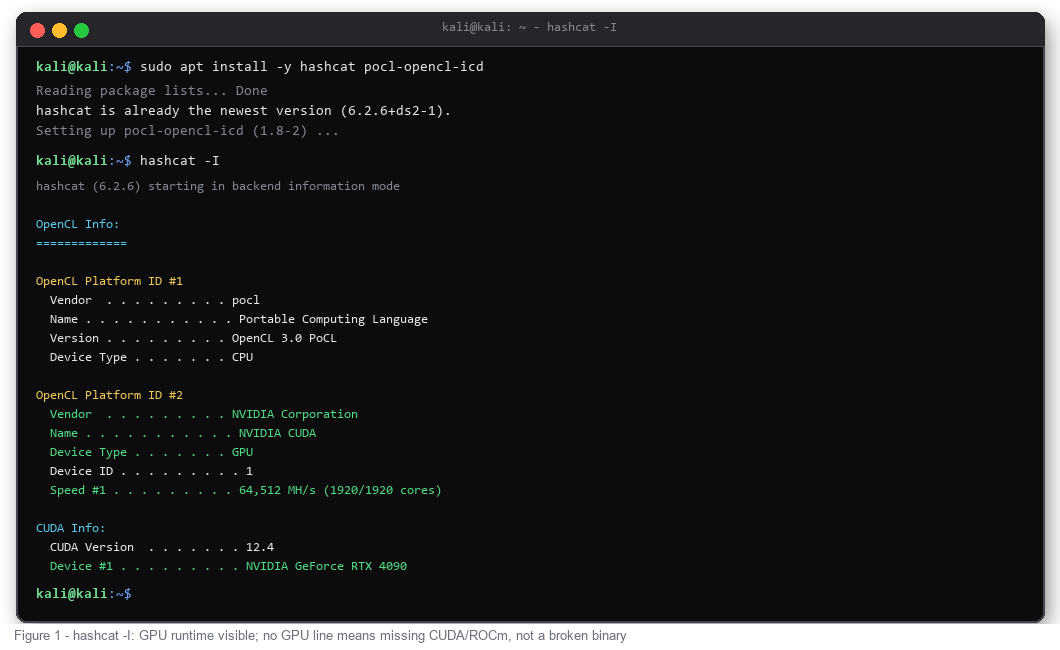
If hashcat -I shows only the pocl CPU platform, the binary works but your driver does not - fix CUDA/ROCm first. No GPU line means no GPU attack.
STEP 2: IDENTIFY THE HASH MODE FIRST
Wrong -m is the most common beginner failure. A 32-character hex string can be Raw MD5, NTLM, MD5(MD5(pass)), or a salted variant - the string itself does not say. hashcat can read the file and tell you:
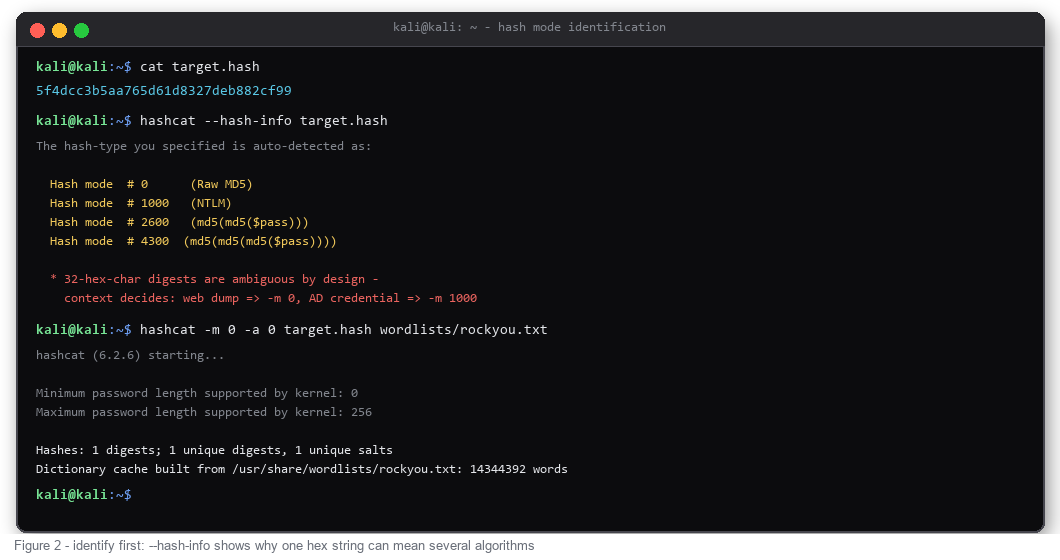
Context decides the winner: a web application dump means -m 0, an Active Directory credential means -m 1000, a shadow file entry ($6$...) means -m 1800. When two modes both fit, run the cheaper one first and let the potfile answer.
STEP 3: DICTIONARY ATTACK WITH RULES
The default working horse is attack mode 0. Feed it a wordlist, multiply every word with a rule file, and the effective candidate count explodes without building a bigger list:
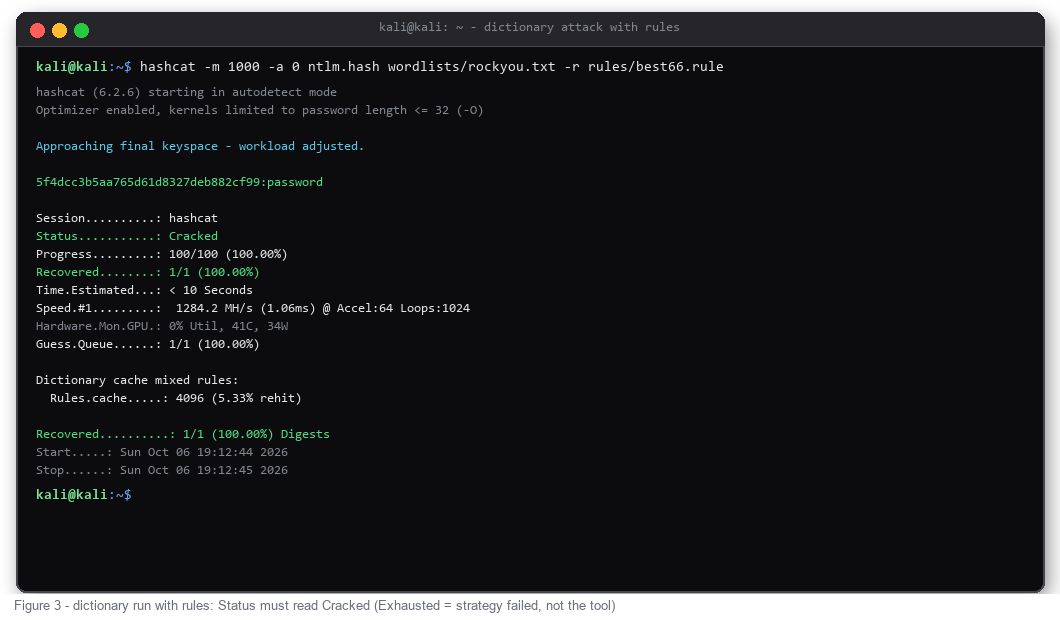
Rules run inside the GPU kernel - best66.rule costs almost nothing in speed and covers capitalisation, digits appended, leetspeak and year suffixes. The wordlist itself matters more than the rule count: breach corpora beat rockyou, and if you collect candidate usernames first, the OSINT workflow in this OSINT tools guide shows where targeted wordlists come from. Feeding the same corpus into a leak-checking pipeline as a final verification step pairs well with this password leak check tool.
STEP 4: MASK ATTACKS WHEN YOU KNOW THE SHAPE
When the policy is known - eight characters, lowercase plus four digits - stop guessing and specify the shape. Masks encode character classes: ?l lowercase, ?u uppercase, ?d digits, ?s special, ?a everything. Attack mode 3 walks every combination of a mask:
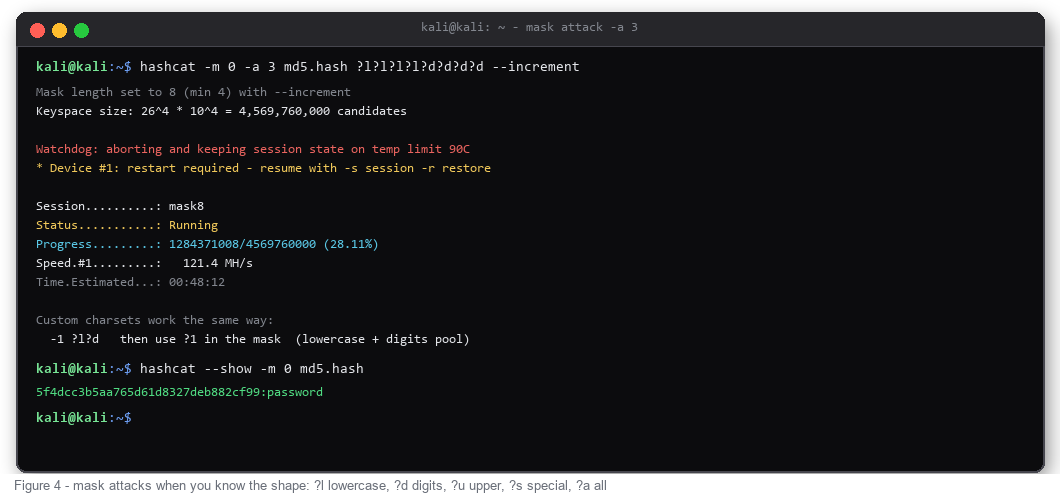
--increment starts at minimum length and grows, so short passwords surface first. Keyspace is arithmetic: ?l?l?l?l?d?d?d?d = 26^4 x 10^4 = 4.5 billion candidates - at 120 MH/s that is under a minute, at CPU speed it is an afternoon. Long masks need session management: hashcat saves state on interrupt, resume with -s restore, and hybrid modes -a 6 / -a 7 glue a wordlist onto a mask when both parts are known.
STEP 5: BENCHMARK BEFORE YOU GUESS
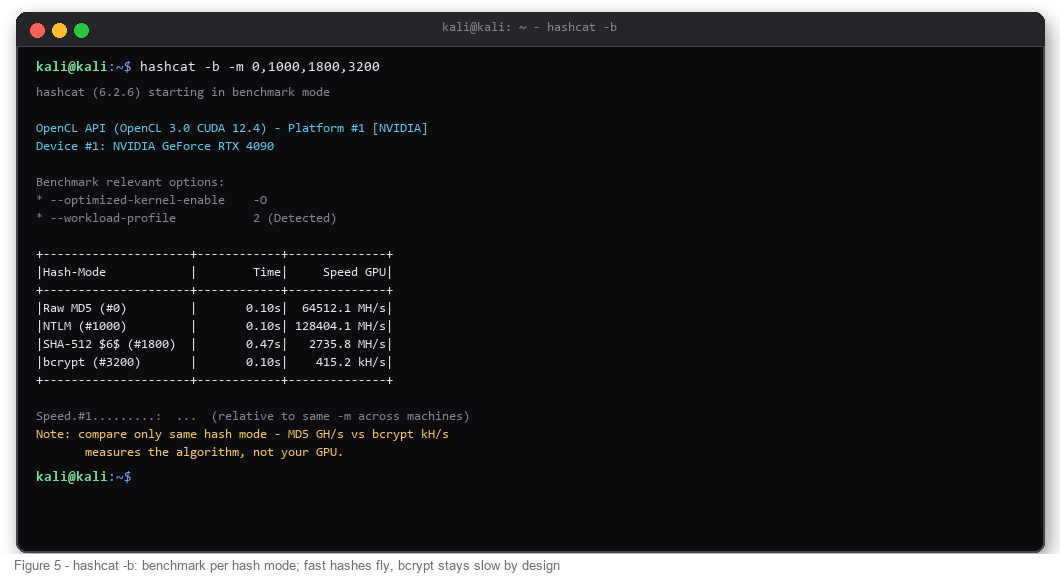
hashcat -b prints per-algorithm speed for your exact hardware. Read it as algorithm difficulty, not raw GPU power: MD5 runs in GH/s, bcrypt stays in kH/s on the same card - bcrypt is deliberately expensive, and no GPU changes that design. Plan attack time from the benchmark, not from hope:
HASH MODE CHEAT SHEET
COMMON MISTAKES
COMMAND CHEAT SHEET
FAQ
hashcat or John the Ripper - which one first?
hashcat for raw GPU throughput on known modes, John for format auto-detection, mangled wordlist formats and gentle CPU-side workflows. In practice they pair: crack the easy share on hashcat, feed the residue to our John the Ripper tutorial workflow for jumbo rules and incremental fallback.
Is running hashcat legal?
On hashes you own or are explicitly authorised to test - audits, CTFs, lab captures - it is standard defensive practice. The same binary does not know the difference outside that scope; authorisation is the line, not the tool.
How fast is MD5 on a modern GPU?
Fast hashes run in billions per second: a current flagship card reaches tens of GH/s on MD5 and NTLM. Slow hashes are the opposite pole - bcrypt and scrypt sit orders of magnitude lower by design. Always benchmark your exact -m with hashcat -b.
Why does --show return nothing after a cracked run?
Cracked pairs live in the potfile, keyed by hash. --show needs the same -m as the original run - wrong mode prints nothing even when the potfile holds the answer.
Which wordlist should I start with?
rockyou.txt (Seclists) for coverage, then append breach-derived lists shaped to the target - company name, product names, years. Rules multiply whatever you feed them; a small targeted list with best64.rule beats a huge generic list alone.
TL;DR
- hashcat is GPU password recovery: two core flags decide everything - -m selects the hash algorithm, -a selects the attack mode (0 = dictionary, 3 = mask, 6/7 = hybrid).
- Always identify the hash first with hashcat --hash-info - guessing -m 0 on an NTLM dump wastes the whole run.
- Start with dictionary + rules (-a 0 -r rules/best66.rule), move to masks (-a 3) when you know the password shape, benchmark with hashcat -b before planning any long attack.
- Status: Cracked means recovered, Exhausted means the candidate set ran out - that is a strategy problem, not a tool failure.
- Results land in potfile (~/.local/share/hashcat/hashcat.potfile); re-read them anytime with hashcat --show.
WHAT HASHCAT ACTUALLY DOES
hashcat takes a hash - the one-way digest of a password - and grinds candidate passwords through the same algorithm until the output matches. There is no decryption; recovery works by re-hashing guesses at GPU speed. On a modern card that means tens of billions of MD5 guesses per second, and hundreds of thousands of bcrypt guesses per second. The two variables every run shares: -m names the algorithm (Raw MD5 = 0, SHA-1 = 100, NTLM = 1000, SHA-512 crypt = 1800, bcrypt = 3200), and -a names the strategy (dictionary, mask, hybrid, combinator, brute-force). Everything else - rules, increments, custom charsets, session restore - modifies those two decisions.
Offline cracking sits next to its online cousin: for password spraying against live logins, this Hydra brute force tutorial covers the network side.
STEP 1: INSTALL AND CONFIRM YOUR RUNTIME
Kali ships hashcat in the default mirror: sudo apt install -y hashcat pocl-opencl-icd. The second package is the CPU fallback runtime - without any OpenCL runtime, hashcat refuses to start with CL_PLATFORM_NOT_FOUND_KHR. With an NVIDIA card, install the CUDA driver so a real GPU platform appears. Verify the stack before anything else:
Code:
hashcat -I          # list every OpenCL/CUDA platform and device
hashcat -b -m 0     # 5-second benchmark on Raw MD5
hashcat -V          # version banner
If hashcat -I shows only the pocl CPU platform, the binary works but your driver does not - fix CUDA/ROCm first. No GPU line means no GPU attack.
STEP 2: IDENTIFY THE HASH MODE FIRST
Wrong -m is the most common beginner failure. A 32-character hex string can be Raw MD5, NTLM, MD5(MD5(pass)), or a salted variant - the string itself does not say. hashcat can read the file and tell you:
Code:
hashcat --hash-info target.hash     # candidate modes with example hashes
hashcat -m 0 --example-hashes       # canonical example for one mode
Context decides the winner: a web application dump means -m 0, an Active Directory credential means -m 1000, a shadow file entry ($6$...) means -m 1800. When two modes both fit, run the cheaper one first and let the potfile answer.
STEP 3: DICTIONARY ATTACK WITH RULES
The default working horse is attack mode 0. Feed it a wordlist, multiply every word with a rule file, and the effective candidate count explodes without building a bigger list:
Code:
hashcat -m 1000 -a 0 ntlm.hash wordlists/rockyou.txt -r rules/best66.rule
hashcat -m 1000 -a 0 ntlm.hash wordlists/rockyou.txt -r rules/d3ad0ne.rule
hashcat --show -m 1000 ntlm.hash     # read the potfile afterwards
Rules run inside the GPU kernel - best66.rule costs almost nothing in speed and covers capitalisation, digits appended, leetspeak and year suffixes. The wordlist itself matters more than the rule count: breach corpora beat rockyou, and if you collect candidate usernames first, the OSINT workflow in this OSINT tools guide shows where targeted wordlists come from. Feeding the same corpus into a leak-checking pipeline as a final verification step pairs well with this password leak check tool.
STEP 4: MASK ATTACKS WHEN YOU KNOW THE SHAPE
When the policy is known - eight characters, lowercase plus four digits - stop guessing and specify the shape. Masks encode character classes: ?l lowercase, ?u uppercase, ?d digits, ?s special, ?a everything. Attack mode 3 walks every combination of a mask:
Code:
hashcat -m 0 -a 3 md5.hash ?l?l?l?l?d?d?d?d --increment
hashcat -m 0 -a 3 md5.hash -1 ?l?d ?1?1?1?1?1?1   # custom charset, six mixed chars
--increment starts at minimum length and grows, so short passwords surface first. Keyspace is arithmetic: ?l?l?l?l?d?d?d?d = 26^4 x 10^4 = 4.5 billion candidates - at 120 MH/s that is under a minute, at CPU speed it is an afternoon. Long masks need session management: hashcat saves state on interrupt, resume with -s restore, and hybrid modes -a 6 / -a 7 glue a wordlist onto a mask when both parts are known.
STEP 5: BENCHMARK BEFORE YOU GUESS
hashcat -b prints per-algorithm speed for your exact hardware. Read it as algorithm difficulty, not raw GPU power: MD5 runs in GH/s, bcrypt stays in kH/s on the same card - bcrypt is deliberately expensive, and no GPU changes that design. Plan attack time from the benchmark, not from hope:
Code:
hashcat -b -m 0,1000,1800,3200,22000HASH MODE CHEAT SHEET
- -m 0 Raw MD5 - web app dumps, the fastest class, GH/s territory
- -m 1000 NTLM - Windows credentials, same speed class as MD5
- -m 100 SHA-1 - legacy tokens, still common in old CMS databases
- -m 1800 SHA-512 crypt ($6$) - modern Linux shadow entries, MH/s class
- -m 3200 bcrypt ($2a$/$2b$) - deliberate slowdown, kH/s class, tune cost factor with -O
- -m 22000 WPA-PBKDF2-PMKID+EAPOL - WiFi handshakes and PMKID captures
COMMON MISTAKES
- Confusing -m with -a. -m is the algorithm, -a is the strategy. Neither substitutes for the other.
- Chasing Exhausted as a bug. Exhausted means the candidate set is empty - switch attack, add rules, widen the mask.
- Ignoring heat and power limits. Watchdog aborts near 90C; hashcat restores with -s restore, plan for thermal headroom on long runs.
- Running optimized kernels blindly. -O caps password length at 32 - fine for policies, wrong for passphrases; drop -O when length matters.
- Expecting bcrypt to fly. Algorithm beats hardware; benchmark with -m 3200 and plan hours, not seconds.
COMMAND CHEAT SHEET
Code:
hashcat -I                            # devices
hashcat --hash-info file              # identify modes
hashcat -m 1000 -a 0 h.txt wl.txt -r rules/best66.rule   # dictionary + rules
hashcat -m 0 -a 3 h.txt ?l?l?l?l?d?d?d?d --increment      # mask
hashcat -m 0 -a 6 h.txt wl.txt ?d?d?d?d                  # hybrid wordlist+mask
hashcat -b -m 0,1000,3200             # benchmark
hashcat --show -m 0 h.txt             # dump cracked pairs from potfile
hashcat -s restore                    # resume interrupted session
FAQ
hashcat or John the Ripper - which one first?
hashcat for raw GPU throughput on known modes, John for format auto-detection, mangled wordlist formats and gentle CPU-side workflows. In practice they pair: crack the easy share on hashcat, feed the residue to our John the Ripper tutorial workflow for jumbo rules and incremental fallback.
Is running hashcat legal?
On hashes you own or are explicitly authorised to test - audits, CTFs, lab captures - it is standard defensive practice. The same binary does not know the difference outside that scope; authorisation is the line, not the tool.
How fast is MD5 on a modern GPU?
Fast hashes run in billions per second: a current flagship card reaches tens of GH/s on MD5 and NTLM. Slow hashes are the opposite pole - bcrypt and scrypt sit orders of magnitude lower by design. Always benchmark your exact -m with hashcat -b.
Why does --show return nothing after a cracked run?
Cracked pairs live in the potfile, keyed by hash. --show needs the same -m as the original run - wrong mode prints nothing even when the potfile holds the answer.
Which wordlist should I start with?
rockyou.txt (Seclists) for coverage, then append breach-derived lists shaped to the target - company name, product names, years. Rules multiply whatever you feed them; a small targeted list with best64.rule beats a huge generic list alone.


