

- Joined
- Dec 30, 2024
- Messages
- 396
- Reaction score
- 208
- Points
- 62
- Website
- blackhatpakistan.net
- Points
- 1,108
- USD
- 1,108
Checking if a password has been leaked means hashing it, comparing that hash against breach corpora, and rotating it if there is a match - without sending your actual password to anyone in the process. The standard method is k-anonymity: you send only the first few characters of your password's hash, the service returns every breached hash sharing that prefix, and the final match happens on your machine where nobody else can see it.
TL;DR - Hash your password locally (SHA-1 for the classic k-anonymity API), send only the first 5 hash characters, compare the returned candidates against your full hash locally, rotate on match. Have I Been Pwned covers emails and passwords, local breach dumps cover everything else, and the follow-up is always the same: unique password per site, password manager, 2FA on anything that holds money or identity.
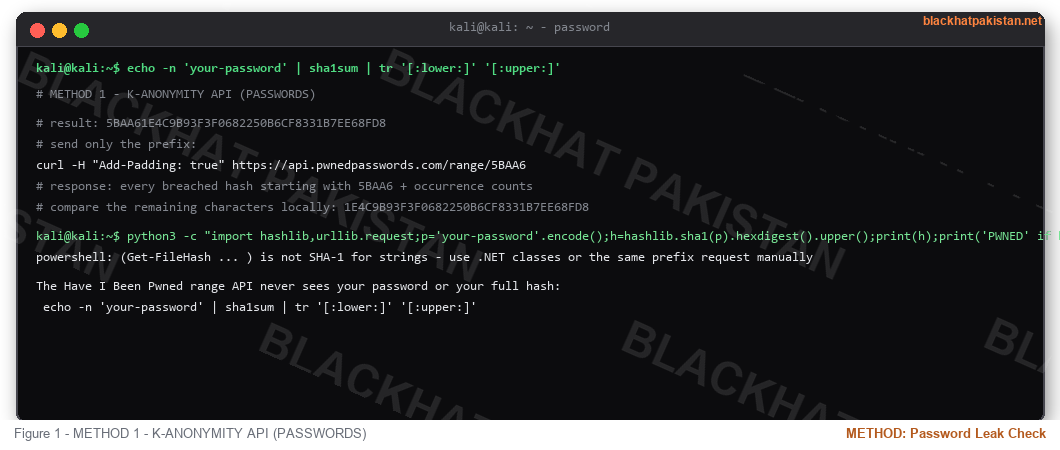
METHOD 1 - K-ANONYMITY API (PASSWORDS)
The Have I Been Pwned range API never sees your password or your full hash:
Add-Padding returns decoy results so the response size does not reveal which prefix you sent. The service learns nothing but a 5-character prefix of a hash of your secret - the entropy left after 5 hex chars is what keeps the design honest, and it is why the final comparison never leaves your terminal.
METHOD 2 - EMAIL AND ACCOUNT CHECKS
- Have I Been Pwned by email - which breaches your address appears in, with dates and data classes.
- Breach corpora searches (DeHashed, IntelligenceX) - the full record: email, password hash, phone, address, as leaked.
- Browser-native checks - Chrome and Firefox now check credentials against local breach datasets during password entry, no site visit needed.
- Credential-stuffing monitors - some services alert when your email shows up in a fresh combo list.
METHOD 3 - LOCAL DUMPS AND OSINT
For thoroughness, the combo lists circulating on forums are searchable the same way breach collections are: hash or plaintext line for your email, grep the lot locally. This is the same data the k-anonymity APIs index, just without the API - the value is covering breaches that have not been indexed yet. Treat anything downloaded this way as hostile input: archives from untrusted sources are where infostealers get reintroduced to the machine doing the searching.
WHAT TO DO WHEN IT MATCHES
- Rotate that password everywhere it was reused - the match means the string is in at least one attacker's corpus, and reuse turns one breach into five.
- Make the replacement unique per site. Password manager generates, stores, autofills - memorizing passwords is the failure mode this whole checklist exists to fix.
- Enable 2FA - the breached password stops being sufficient by itself. App-based or hardware keys over SMS, which rides the same SS7 path SIM-swap attacks use.
- Check session and recovery settings - breached accounts often carry attacker-set recovery emails and lingering API tokens.
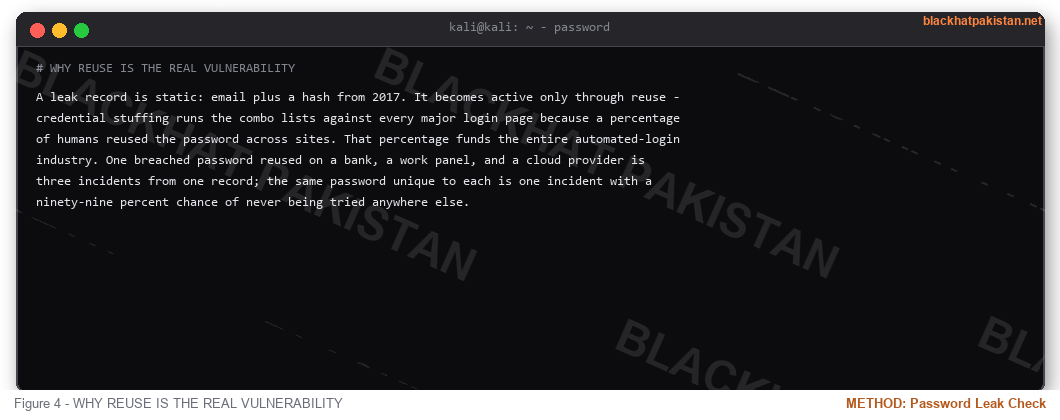
WHY REUSE IS THE REAL VULNERABILITY
A leak record is static: email plus a hash from 2017. It becomes active only through reuse - credential stuffing runs the combo lists against every major login page because a percentage of humans reused the password across sites. That percentage funds the entire automated-login industry. One breached password reused on a bank, a work panel, and a cloud provider is three incidents from one record; the same password unique to each is one incident with a ninety-nine percent chance of never being tried anywhere else.
FAQ
Q: Does sending 5 hash characters expose the password?
A: The prefix narrows to roughly a million candidates; the remaining 15 hex characters stay local. Brute-forcing the full hash from the prefix alone is a SHA-1 preimage problem, not a prefix problem.
Q: My password shows up but I never reused it. Worry?
A: If it was unique and the service it belonged to is dead or updated, the practical risk is low - but the breach context (was it hashed properly?) decides. Rotating is cheap; deciding not to is a bet on someone else's salting.
Q: Which is safer, the API or checking manually?
A: The k-anonymity API, because the manual alternative is pasting your password into a web form. Any checker that asks for the plaintext password in a field is either misunderstanding the design or collecting inputs.
Q: How do blue teams use this data?
A: Defensive side: monitoring employee addresses in fresh breaches for takeover risk, and blocking breached password strings at reset time (Azure AD and similar do this natively). Offensive side: the same combo lists feed credential-stuffing simulations during authorized assessments.
RELATED ON BLACKHAT PAKISTAN
Hydra Brute Force Tutorial 2026 - what runs against passwords that stay weak.
OSINT Tools for Beginners - breach and person-search surfaces.
Linux Privilege Escalation Checklist 2026 - stored credentials as a path on-box.
Windows Privilege Escalation - cmdkey, autologon, and the credential trail on Windows.
TL;DR - Hash your password locally (SHA-1 for the classic k-anonymity API), send only the first 5 hash characters, compare the returned candidates against your full hash locally, rotate on match. Have I Been Pwned covers emails and passwords, local breach dumps cover everything else, and the follow-up is always the same: unique password per site, password manager, 2FA on anything that holds money or identity.
METHOD 1 - K-ANONYMITY API (PASSWORDS)
The Have I Been Pwned range API never sees your password or your full hash:
Code:
echo -n 'your-password' | sha1sum | tr '[:lower:]' '[:upper:]'

# result: 5BAA61E4C9B93F3F0682250B6CF8331B7EE68FD8

# send only the prefix:

curl -H "Add-Padding: true" https://api.pwnedpasswords.com/range/5BAA6

# response: every breached hash starting with 5BAA6 + occurrence counts

# compare the remaining characters locally: 1E4C9B93F3F0682250B6CF8331B7EE68FD8
Add-Padding returns decoy results so the response size does not reveal which prefix you sent. The service learns nothing but a 5-character prefix of a hash of your secret - the entropy left after 5 hex chars is what keeps the design honest, and it is why the final comparison never leaves your terminal.
Code:
python3 -c "import hashlib,urllib.request;p='your-password'.encode();h=hashlib.sha1(p).hexdigest().upper();print(h);print('PWNED' if h[5:] in urllib.request.urlopen('https://api.pwnedpasswords.com/range/'+h[:5]).read().decode() else 'clean')"

powershell: (Get-FileHash ... ) is not SHA-1 for strings - use .NET classes or the same prefix request manually
METHOD 2 - EMAIL AND ACCOUNT CHECKS
- Have I Been Pwned by email - which breaches your address appears in, with dates and data classes.
- Breach corpora searches (DeHashed, IntelligenceX) - the full record: email, password hash, phone, address, as leaked.
- Browser-native checks - Chrome and Firefox now check credentials against local breach datasets during password entry, no site visit needed.
- Credential-stuffing monitors - some services alert when your email shows up in a fresh combo list.
METHOD 3 - LOCAL DUMPS AND OSINT
For thoroughness, the combo lists circulating on forums are searchable the same way breach collections are: hash or plaintext line for your email, grep the lot locally. This is the same data the k-anonymity APIs index, just without the API - the value is covering breaches that have not been indexed yet. Treat anything downloaded this way as hostile input: archives from untrusted sources are where infostealers get reintroduced to the machine doing the searching.
WHAT TO DO WHEN IT MATCHES
- Rotate that password everywhere it was reused - the match means the string is in at least one attacker's corpus, and reuse turns one breach into five.
- Make the replacement unique per site. Password manager generates, stores, autofills - memorizing passwords is the failure mode this whole checklist exists to fix.
- Enable 2FA - the breached password stops being sufficient by itself. App-based or hardware keys over SMS, which rides the same SS7 path SIM-swap attacks use.
- Check session and recovery settings - breached accounts often carry attacker-set recovery emails and lingering API tokens.
WHY REUSE IS THE REAL VULNERABILITY
A leak record is static: email plus a hash from 2017. It becomes active only through reuse - credential stuffing runs the combo lists against every major login page because a percentage of humans reused the password across sites. That percentage funds the entire automated-login industry. One breached password reused on a bank, a work panel, and a cloud provider is three incidents from one record; the same password unique to each is one incident with a ninety-nine percent chance of never being tried anywhere else.
FAQ
Q: Does sending 5 hash characters expose the password?
A: The prefix narrows to roughly a million candidates; the remaining 15 hex characters stay local. Brute-forcing the full hash from the prefix alone is a SHA-1 preimage problem, not a prefix problem.
Q: My password shows up but I never reused it. Worry?
A: If it was unique and the service it belonged to is dead or updated, the practical risk is low - but the breach context (was it hashed properly?) decides. Rotating is cheap; deciding not to is a bet on someone else's salting.
Q: Which is safer, the API or checking manually?
A: The k-anonymity API, because the manual alternative is pasting your password into a web form. Any checker that asks for the plaintext password in a field is either misunderstanding the design or collecting inputs.
Q: How do blue teams use this data?
A: Defensive side: monitoring employee addresses in fresh breaches for takeover risk, and blocking breached password strings at reset time (Azure AD and similar do this natively). Offensive side: the same combo lists feed credential-stuffing simulations during authorized assessments.
RELATED ON BLACKHAT PAKISTAN
Hydra Brute Force Tutorial 2026 - what runs against passwords that stay weak.
OSINT Tools for Beginners - breach and person-search surfaces.
Linux Privilege Escalation Checklist 2026 - stored credentials as a path on-box.
Windows Privilege Escalation - cmdkey, autologon, and the credential trail on Windows.
Last edited:


