

- Joined
- Dec 30, 2024
- Messages
- 399
- Reaction score
- 209
- Points
- 62
- Website
- blackhatpakistan.net
- Points
- 1,198
- USD
- 1,198
You spot a phishing email by checking three things in order: the sender's actual domain after the @ sign and in the reply-path header, the destination URL after resolving every redirect and tracking wrapper, and the pressure tactics in the body — urgency, threat, or a reward that requires clicking within minutes. In 2026 phishing delivers over 90% of initial access intrusions per Verizon's DBIR, so the check is not optional hygiene, it is the firewall between you and credential theft.
TL;DR - Fifteen red flags in three groups: sender (display-name spoofing, lookalike domains, failed SPF/DKIM), body (urgency deadlines, invoice pretense, mismatched tone, QR codes), links (shorteners, IP hosts, homoglyph paths, unexpected attachments). Read headers in 60 seconds with Gmail's "Show original" or any client's raw view — SPF, DKIM and DMARC must all pass and the domain must match. If you already clicked: revoke sessions, rotate the password, run it through a leak checker, freeze credit in the US. October is Cybersecurity Awareness Month — this is the drill.
WHAT COUNTS AS PHISHING IN 2026
Phishing is any message engineered to make you hand over a credential, a session token, a payment, or access — email is the main channel, SMS (smishing) and voice (vishing) are the same playbook on different wires. The scale is boring in its consistency: industry trackers count millions of attempted phishing sites monthly, email remains the vector behind the overwhelming majority of breaches, and the content quality has improved enough that the old "Nigerian prince" instinct no longer protects anyone. The 2026 attack reads like your bank's operations team wrote it, because attackers copy real templates pixel-for-pixel and only swap the form action.
RED FLAGS 1-5 - THE SENDER LINE
- 1. Display name says "IT Support," actual address is @mail-support-secure.com. The name field is decoration - the domain after @ is the identity, and the envelope sender in the headers is the one that matters forensically.
- 2. Lookalike domains: paypa1.com, micr0soft.com, 0ffice365-login.net. One digit, one homoglyph, or a hyphen away from the real thing. Check character by character from right to left, starting at the TLD.
- 3. Reply-to points somewhere else. Header From shows billing@chase.com while Reply-To redirects to a free mail provider - automated scanners check From, humans never think to check Reply-To.
- 4. SPF, DKIM or DMARC shows fail in the authentication results header. All three must pass AND align with the visible From domain. "pass" on a domain you have never heard of proves nothing.
- 5. The sending infrastructure does not belong to the brand. Real PayPal mail originates from PayPal's own annotated infrastructure - a cheap VPS in another country carrying their name is a costume, not a uniform.
RED FLAGS 6-10 - THE BODY COPY
- 6. A clock: "your account closes in 24 hours," "unusual login detected - verify within 30 minutes." Manufactured urgency exists to delete the time you would spend checking.
- 7. Invoice and package pretense: fake FedEx, IRS, USPS and university payroll messages spike every October in the US because tax and shipping seasons give them real-world camouflage.
- 8. Tone mismatch - your actual bank does not write "Dear customer" to an account that has had your name on file for a decade, and it does not send grammar that its legal team would execute on sight.
- 9. QR codes in the body (quishing). The code hides the destination from both your eyes and most link scanners, and it moves the victim onto their phone where corporate protections do not follow.
- 10. Unexpected request to change payment details, buy gift cards, or wire transfer - the business email compromise pattern. Verify out-of-band: call the person on a number you already had, never the number in the message.
RED FLAGS 11-15 - LINKS AND ATTACHMENTS
- 11. URL shorteners (bit.ly, tinyurl, generic redirectors) hiding the final hop. Hover - do not click - and read the full path, or expand it first (method below).
- 12. Raw IP address hosts (http://192.168.x.x/login or random decimal hosts). No legitimate consumer brand serves its login page from a naked IP.
- 13. Homoglyph paths and subdomain tricks: account-verify.paypal.com.attacker.tld - the real domain is the LAST two labels, everything before is the attacker's own namespace.
- 14. Login page asks for password twice, or asks for password + PIN + SSN in one form. Credential harvester forms collect greedily because they get one shot.
- 15. Attachments you did not expect: .html, .htm, .iso, .img, .lnk, macro-enabled Office files. HTML attachments mimic login pages offline and bypass many gateway scanners.
LIVE FORENSICS - READING HEADERS IN 60 SECONDS
Every mail client exposes the raw headers. Gmail: three dots -> "Show original." Outlook: open message -> File -> Properties -> Internet Headers. Thunderbird: Ctrl+U. Then read the authentication block:
Three passes plus a From domain that matches the brand's real MX records is clean. Anything else — fail, softfail, missing DKIM, or pass on a domain that is not the brand — treat as hostile. Look at the Received chain too: mail physically originating from an ASN in a country the brand does not operate in, after the claimed infrastructure, is the tell headers rarely lie about.
URL CHECKS WITHOUT CLICKING
If the final hop is not on the brand's own domain, nothing else on the page matters. A login form hosted anywhere except the brand's domain is a harvesting terminal, full stop.
THE PAYLOAD BEHIND THE CLICK
A phished credential rarely dies with one login. Attackers replay it: credential stuffing runs your email-password pair against hundreds of services because password reuse is still the norm, and anything that survives gets cracked offline if it was weak in the first place. That chain — harvested password, stuffed elsewhere, cracked when reused — is exactly why a leak check and a password manager matter more than any spam filter.
SMISHING AND VISHING - SAME PLAYBOOK, DIFFERENT WIRE
SMS phishing reuses every rule above with 160 characters of room: USPS "delivery failed" texts with .top or .icu short links, fake bank fraud-alert replies, and 2026's favorite — job scam texts that move you to Telegram and then to a "training portal" that wants a deposit. Voice phishing (vishing) adds recordings of real executive voices cloned in seconds and callback numbers that play a perfect IVR menu. The countermeasure is identical: the channel never authenticates the request — only a verified out-of-band contact does. Hang up, dial the number on the back of your card, the official app, or the number on the company's own site.
WHAT TO DO IF YOU ALREADY CLICKED
- Minutes 0-10: disconnect if a download ran; if it was only a credential form, move to the next step immediately. Every minute a live session token sits unrotated is a minute the attacker owns.
- Minutes 10-30: change the password from a different device, revoke active sessions (Gmail: Security -> Manage all devices; Microsoft: Account -> Sign-in activity), and enable an authenticator app over SMS where offered.
- Same day: check the address at a breach-lookup service, scan the machine if any executable or macro ran, and warn your household or team — shared passwords and forwarded threads propagate the incident.
- US residents: place a fraud alert or credit freeze with Equifax, Experian and TransUnion (free, statutory), and file at reportfraud.ftc.gov if money moved. Screenshot everything before you delete the message.
TRAIN YOUR EYE - THE 60-SECOND DAILY DRILL
Skill comes from reps, not reading. Once a day, take any suspicious-looking message — or pull one from your spam folder — and run the full sequence cold: sender domain, header auth, hover the link, check the deadline pressure, decide. Thirty days of that and the fifteen flags stop being a checklist and become a reflex you fire before you finish reading the first line.
FAQ
- Q: How do I spot a phishing email in one glance? A: Read the domain after the @, then hold your cursor over the link and read the domain at the end of the URL. If either one is not the exact brand domain, it is phishing — no further reading required.
- Q: Can an email pass SPF and still be phishing? A: Yes. SPF and DKIM prove the sender controls the domain they claim — if the domain itself is a lookalike like secure- chase.com, authentication passes on the attacker's own namespace. Domain identity comes first, auth results second.
- Q: Are QR codes in emails safe to scan? A: No. Quishing codes hide the destination from link scanners and move the victim to a phone outside corporate protection. Treat any unexpected email QR code as a link you refuse to open.
- Q: Does my company's spam filter make these checks unnecessary? A: Filters catch bulk campaigns and known infrastructure; targeted spear-phishing and business email compromise arrive with valid authentication on lookalike or compromised real domains. The filter is layer one, the fifteen flags are layer two.
- Q: I replied to a phishing email with no data — am I safe? A: You confirmed the address is live and you read mail, which raises the value of the address for spam and follow-up targeting. Do not reply, not even to say no; mark as phishing so the provider learns the fingerprint.
RELATED ON BLACKHAT PAKISTAN
Password Leak Check - run every credential you have ever typed into a phishing form the day it happens.
OSINT Tools for Beginners - reverse-search sender domains, profile pictures and attachment origins like an investigator.
Wireshark Tutorial - watch what a clicked link actually talks to on the wire after the landing page loads.
John the Ripper - the offline cracking step attackers run on harvested passwords, and why reuse dies here.
TL;DR - Fifteen red flags in three groups: sender (display-name spoofing, lookalike domains, failed SPF/DKIM), body (urgency deadlines, invoice pretense, mismatched tone, QR codes), links (shorteners, IP hosts, homoglyph paths, unexpected attachments). Read headers in 60 seconds with Gmail's "Show original" or any client's raw view — SPF, DKIM and DMARC must all pass and the domain must match. If you already clicked: revoke sessions, rotate the password, run it through a leak checker, freeze credit in the US. October is Cybersecurity Awareness Month — this is the drill.
WHAT COUNTS AS PHISHING IN 2026
Phishing is any message engineered to make you hand over a credential, a session token, a payment, or access — email is the main channel, SMS (smishing) and voice (vishing) are the same playbook on different wires. The scale is boring in its consistency: industry trackers count millions of attempted phishing sites monthly, email remains the vector behind the overwhelming majority of breaches, and the content quality has improved enough that the old "Nigerian prince" instinct no longer protects anyone. The 2026 attack reads like your bank's operations team wrote it, because attackers copy real templates pixel-for-pixel and only swap the form action.
RED FLAGS 1-5 - THE SENDER LINE
- 1. Display name says "IT Support," actual address is @mail-support-secure.com. The name field is decoration - the domain after @ is the identity, and the envelope sender in the headers is the one that matters forensically.
- 2. Lookalike domains: paypa1.com, micr0soft.com, 0ffice365-login.net. One digit, one homoglyph, or a hyphen away from the real thing. Check character by character from right to left, starting at the TLD.
- 3. Reply-to points somewhere else. Header From shows billing@chase.com while Reply-To redirects to a free mail provider - automated scanners check From, humans never think to check Reply-To.
- 4. SPF, DKIM or DMARC shows fail in the authentication results header. All three must pass AND align with the visible From domain. "pass" on a domain you have never heard of proves nothing.
- 5. The sending infrastructure does not belong to the brand. Real PayPal mail originates from PayPal's own annotated infrastructure - a cheap VPS in another country carrying their name is a costume, not a uniform.
RED FLAGS 6-10 - THE BODY COPY
- 6. A clock: "your account closes in 24 hours," "unusual login detected - verify within 30 minutes." Manufactured urgency exists to delete the time you would spend checking.
- 7. Invoice and package pretense: fake FedEx, IRS, USPS and university payroll messages spike every October in the US because tax and shipping seasons give them real-world camouflage.
- 8. Tone mismatch - your actual bank does not write "Dear customer" to an account that has had your name on file for a decade, and it does not send grammar that its legal team would execute on sight.
- 9. QR codes in the body (quishing). The code hides the destination from both your eyes and most link scanners, and it moves the victim onto their phone where corporate protections do not follow.
- 10. Unexpected request to change payment details, buy gift cards, or wire transfer - the business email compromise pattern. Verify out-of-band: call the person on a number you already had, never the number in the message.
RED FLAGS 11-15 - LINKS AND ATTACHMENTS
- 11. URL shorteners (bit.ly, tinyurl, generic redirectors) hiding the final hop. Hover - do not click - and read the full path, or expand it first (method below).
- 12. Raw IP address hosts (http://192.168.x.x/login or random decimal hosts). No legitimate consumer brand serves its login page from a naked IP.
- 13. Homoglyph paths and subdomain tricks: account-verify.paypal.com.attacker.tld - the real domain is the LAST two labels, everything before is the attacker's own namespace.
- 14. Login page asks for password twice, or asks for password + PIN + SSN in one form. Credential harvester forms collect greedily because they get one shot.
- 15. Attachments you did not expect: .html, .htm, .iso, .img, .lnk, macro-enabled Office files. HTML attachments mimic login pages offline and bypass many gateway scanners.
LIVE FORENSICS - READING HEADERS IN 60 SECONDS
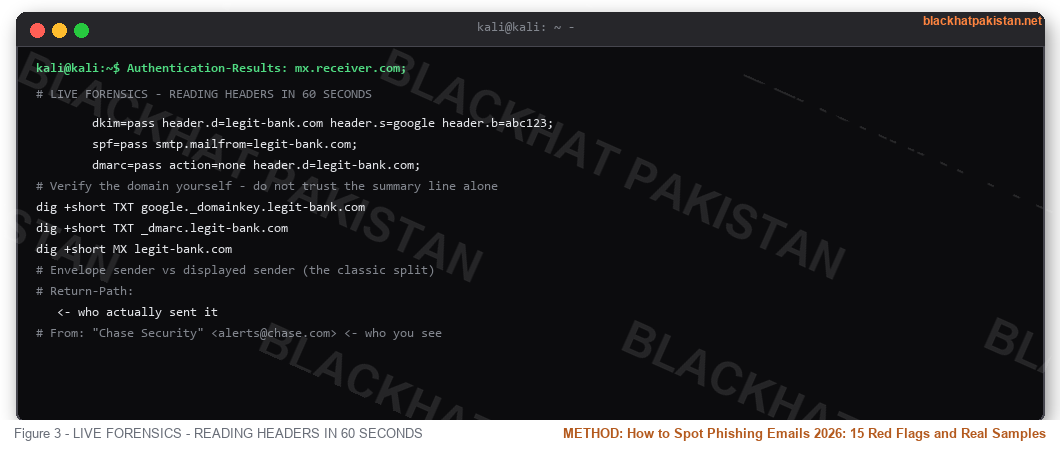
Every mail client exposes the raw headers. Gmail: three dots -> "Show original." Outlook: open message -> File -> Properties -> Internet Headers. Thunderbird: Ctrl+U. Then read the authentication block:
Code:
Authentication-Results: mx.receiver.com;

        dkim=pass header.d=legit-bank.com header.s=google header.b=abc123;

        spf=pass smtp.mailfrom=legit-bank.com;

        dmarc=pass action=none header.d=legit-bank.com;

# Verify the domain yourself - do not trust the summary line alone

dig +short TXT google._domainkey.legit-bank.com

dig +short TXT _dmarc.legit-bank.com

dig +short MX legit-bank.com

# Envelope sender vs displayed sender (the classic split)

# Return-Path: <bounce@attacker-vps.xyz>   <- who actually sent it

# From: "Chase Security" <alerts@chase.com> <- who you see
Three passes plus a From domain that matches the brand's real MX records is clean. Anything else — fail, softfail, missing DKIM, or pass on a domain that is not the brand — treat as hostile. Look at the Received chain too: mail physically originating from an ASN in a country the brand does not operate in, after the claimed infrastructure, is the tell headers rarely lie about.
URL CHECKS WITHOUT CLICKING
Code:
# Destination check - headers only, no body download

curl -sIL --max-redirs 10 "https://suspicious.example/promo" | grep -iE "^(HTTP|location):"

# Passive sandbox - load the URL in someone else's browser

curl -s "https://urlscan.io/api/v1/search/?q=page.url%3A%22URL%22" | head -50

# Domain age - registered yesterday, impersonating a decade-old brand

whois suspicious-example.com | grep -iE "creation date|registrar:"

# Homoglyph / punycode check on the hostname

python -c "import idna,sys; print(idna.encode('раypal.com'))"

# xn--raypal-2za.com  <- Cyrillic characters, not latin 'a'
If the final hop is not on the brand's own domain, nothing else on the page matters. A login form hosted anywhere except the brand's domain is a harvesting terminal, full stop.
THE PAYLOAD BEHIND THE CLICK
A phished credential rarely dies with one login. Attackers replay it: credential stuffing runs your email-password pair against hundreds of services because password reuse is still the norm, and anything that survives gets cracked offline if it was weak in the first place. That chain — harvested password, stuffed elsewhere, cracked when reused — is exactly why a leak check and a password manager matter more than any spam filter.
SMISHING AND VISHING - SAME PLAYBOOK, DIFFERENT WIRE
SMS phishing reuses every rule above with 160 characters of room: USPS "delivery failed" texts with .top or .icu short links, fake bank fraud-alert replies, and 2026's favorite — job scam texts that move you to Telegram and then to a "training portal" that wants a deposit. Voice phishing (vishing) adds recordings of real executive voices cloned in seconds and callback numbers that play a perfect IVR menu. The countermeasure is identical: the channel never authenticates the request — only a verified out-of-band contact does. Hang up, dial the number on the back of your card, the official app, or the number on the company's own site.
WHAT TO DO IF YOU ALREADY CLICKED
- Minutes 0-10: disconnect if a download ran; if it was only a credential form, move to the next step immediately. Every minute a live session token sits unrotated is a minute the attacker owns.
- Minutes 10-30: change the password from a different device, revoke active sessions (Gmail: Security -> Manage all devices; Microsoft: Account -> Sign-in activity), and enable an authenticator app over SMS where offered.
- Same day: check the address at a breach-lookup service, scan the machine if any executable or macro ran, and warn your household or team — shared passwords and forwarded threads propagate the incident.
- US residents: place a fraud alert or credit freeze with Equifax, Experian and TransUnion (free, statutory), and file at reportfraud.ftc.gov if money moved. Screenshot everything before you delete the message.
TRAIN YOUR EYE - THE 60-SECOND DAILY DRILL
Skill comes from reps, not reading. Once a day, take any suspicious-looking message — or pull one from your spam folder — and run the full sequence cold: sender domain, header auth, hover the link, check the deadline pressure, decide. Thirty days of that and the fifteen flags stop being a checklist and become a reflex you fire before you finish reading the first line.
FAQ
- Q: How do I spot a phishing email in one glance? A: Read the domain after the @, then hold your cursor over the link and read the domain at the end of the URL. If either one is not the exact brand domain, it is phishing — no further reading required.
- Q: Can an email pass SPF and still be phishing? A: Yes. SPF and DKIM prove the sender controls the domain they claim — if the domain itself is a lookalike like secure- chase.com, authentication passes on the attacker's own namespace. Domain identity comes first, auth results second.
- Q: Are QR codes in emails safe to scan? A: No. Quishing codes hide the destination from link scanners and move the victim to a phone outside corporate protection. Treat any unexpected email QR code as a link you refuse to open.
- Q: Does my company's spam filter make these checks unnecessary? A: Filters catch bulk campaigns and known infrastructure; targeted spear-phishing and business email compromise arrive with valid authentication on lookalike or compromised real domains. The filter is layer one, the fifteen flags are layer two.
- Q: I replied to a phishing email with no data — am I safe? A: You confirmed the address is live and you read mail, which raises the value of the address for spam and follow-up targeting. Do not reply, not even to say no; mark as phishing so the provider learns the fingerprint.
RELATED ON BLACKHAT PAKISTAN
Password Leak Check - run every credential you have ever typed into a phishing form the day it happens.
OSINT Tools for Beginners - reverse-search sender domains, profile pictures and attachment origins like an investigator.
Wireshark Tutorial - watch what a clicked link actually talks to on the wire after the landing page loads.
John the Ripper - the offline cracking step attackers run on harvested passwords, and why reuse dies here.


