

- Joined
- Dec 30, 2024
- Messages
- 396
- Reaction score
- 208
- Points
- 62
- Website
- blackhatpakistan.net
- Points
- 1,108
- USD
- 1,108
Setting up Tor Browser means downloading the signed build from the official site, extracting it anywhere, and answering one dialog on first launch - the whole path from zero to a private session takes about five minutes on a normal connection. This guide walks every screen: the download page and signature check, the portable extract-and-run install, the Connect vs Configure choice (bridges live in Configure), the Security Level slider that actually changes what websites can do, and the circuit panel that shows which relays carry your traffic.
TL;DR - Download from torproject.org only, verify the .asc signature, extract the folder anywhere (no installer, no admin rights), launch and press Connect. Then immediately move the Security Level slider to Safer, confirm the circuit panel works from the padlock, and never install extensions or resize the window. If Connect fails on your network, rerun and choose Configure -> Bridges -> Provide a bridge (obfs4 or Snowflake).
STEP 1 - DOWNLOAD THE SIGNED BUILD
Go to the official domain (torproject.org) and use the download page - mirror links exist but the signature verification step is the same either way. Grab the .exe and its matching .asc file together.
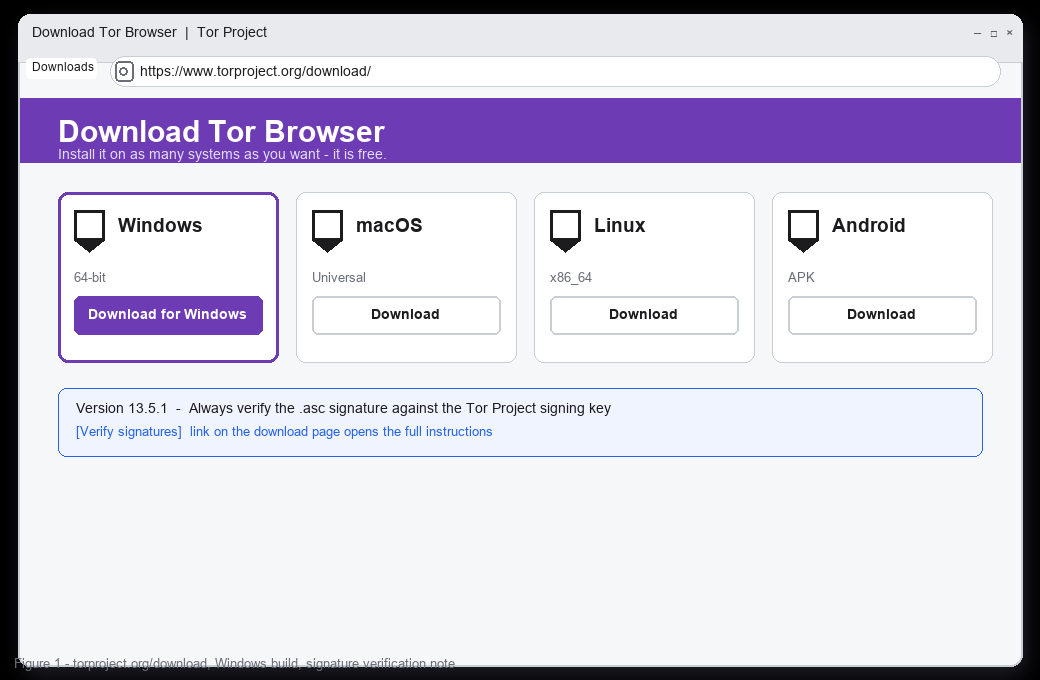
Why the signature step is not optional: you are about to run a program that will see your sensitive traffic, so the file must be proven to come from the Tor Project signing key and not from a lookalike download. The verify link on the page walks the exact commands (gpg --verify on Linux/macOS, or a GUI tool on Windows); the check takes a minute and the result is either a good signature from the expected key or a stop signal.
STEP 2 - EXTRACT AND LAUNCH
Tor Browser does not install into Program Files - it is portable by design, so you extract the folder anywhere (Downloads, a USB stick, a second drive) and run the launcher from inside it. The folder carries its own Firefox-derived binaries, its own configuration, and its own data directory; nothing touches the system browser.
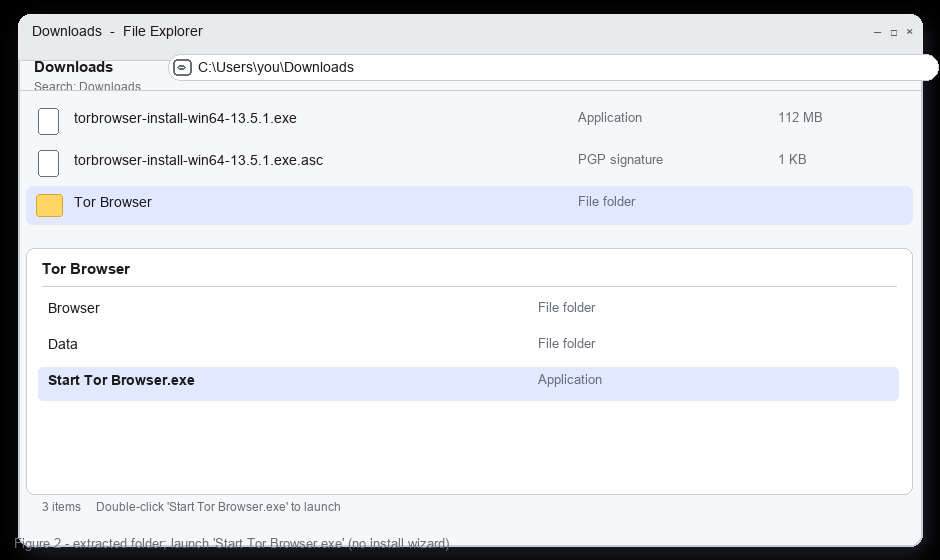
Double-click Start Tor Browser.exe (or the shell script on Linux). No admin prompt should appear - if it does, you have the wrong file. Keeping it on removable media is a legitimate pattern: the whole profile, including bookmarks added during a session, lives in the folder and leaves with the stick.
STEP 3 - THE FIRST-RUN DIALOG: CONNECT VS CONFIGURE
The launch window offers two paths, and the choice determines whether you get the default network path or the configuration screens.
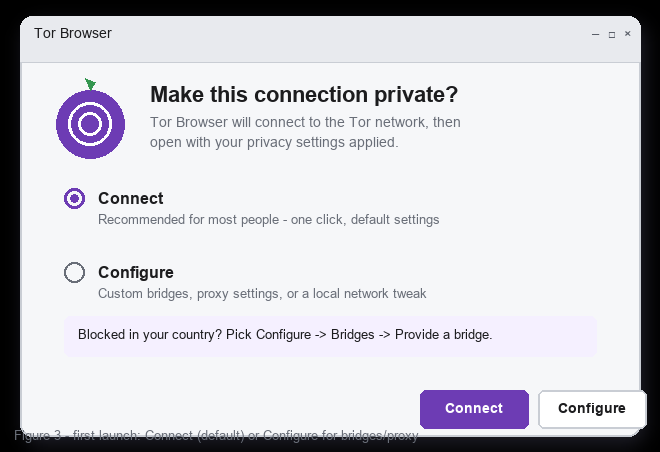
Connect is correct for most people: Tor Browser picks an entry guard, builds a circuit, and opens the start page. Configure is where bridges, a local proxy, and custom connection settings live - the choice for networks that block Tor relays outright. The connection progress window shows circuit construction; on a normal connection it clears in seconds, on a congested or censored path it can take longer or fail outright.
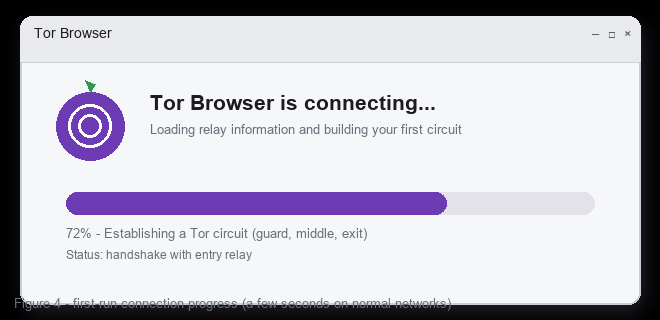
If the connection fails repeatedly, that is the network blocking Tor, not a broken install: relaunch, choose Configure, select bridges, and let Tor Browser give you a pluggable-transport bridge (obfs4 reshapes the traffic to look like nothing recognizable, Snowflake rides volunteer WebRTC capacity, meek hides behind a CDN). One bridge line at a time - stacking bridges does not help.
STEP 4 - SECURITY LEVEL SLIDER (DO THIS BEFORE BROWSING)
The shield icon at the right of the toolbar opens the Security Level panel, and this single control changes what websites are allowed to do inside the browser.
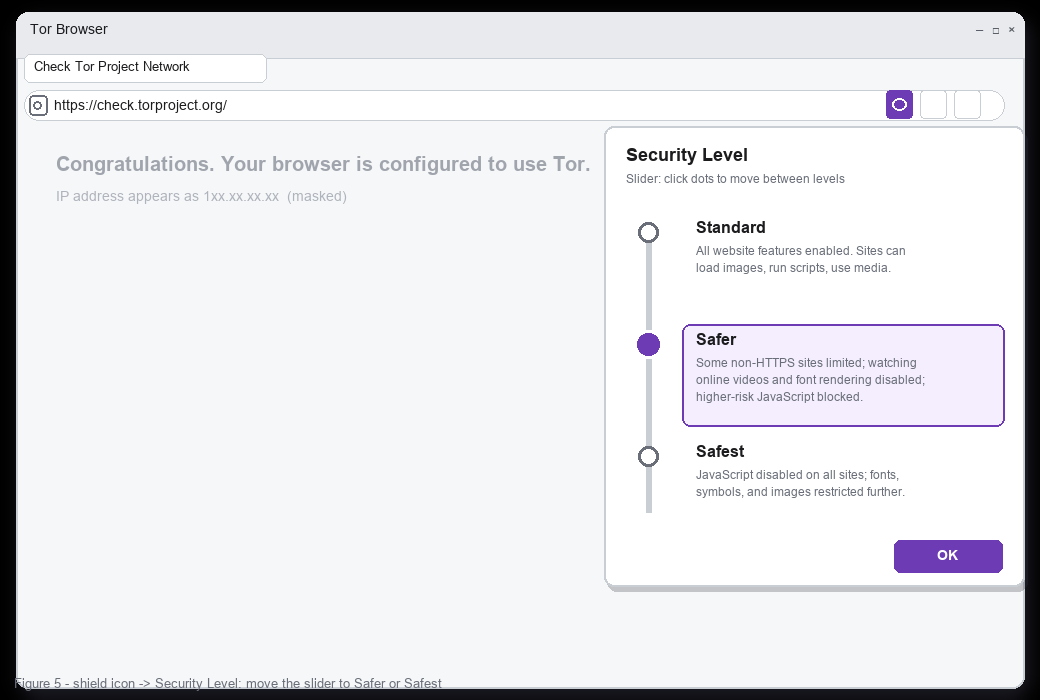
The slider persists per session profile. Moving to Safer before the first real browse is the cheapest hardening step in this entire guide - it costs almost no compatibility and removes entire classes of drive-by script.
STEP 5 - VERIFY THE CIRCUIT
The site-info control (padlock area) at the left of the address bar opens the circuit panel: which entry guard, middle relay, and exit relay this tab is using, with the guard marked as stable.
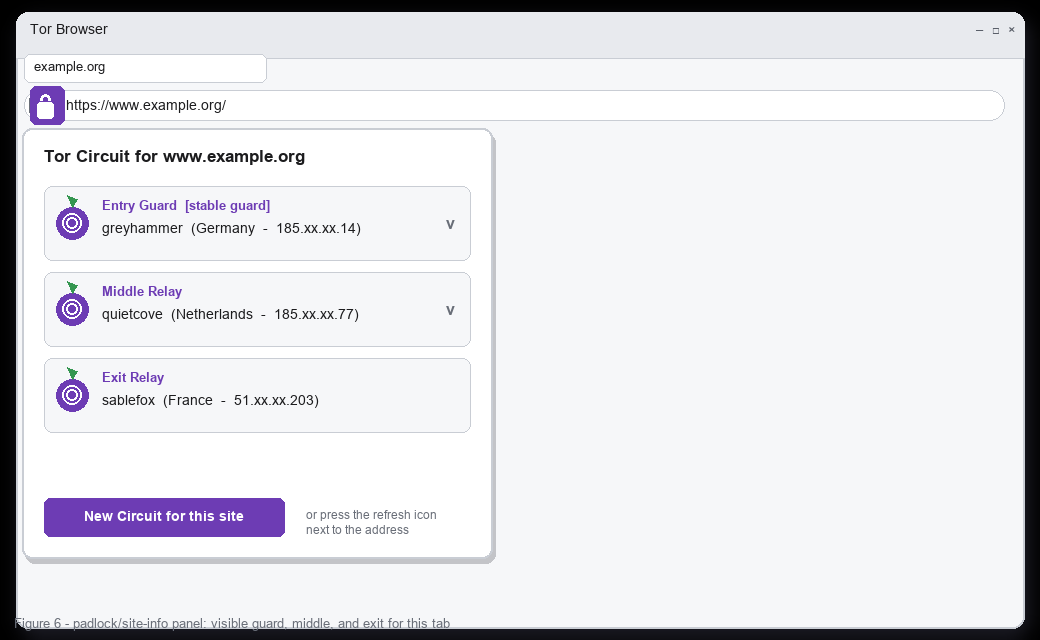
The New Circuit button rebuilds it - useful when an exit is slow, rate-limited, or geographically wrong for the service you are reaching. Note what the panel shows about your threat model: the entry guard sees your real address (that is unavoidable and by design, mitigated by keeping the guard stable), the exit sees the destination and any unencrypted content. Sites you log into over Tor are correlatable from the service side no matter which circuit you draw - the panel shows network state, not account state.
STEP 6 - CONFIG CHECKS THAT STAY
COMMON PROBLEMS
FAQ
Q: Do I need to uninstall or configure anything system-wide?
A: No - portable by design, admin rights not required, nothing added to the system browser. Deleting the folder is a complete uninstall (except anything you downloaded through it).
Q: Connect or Configure - which for a first-time user?
A: Connect, then Security Level to Safer, then browse. Configure only if Connect fails or you have a specific network requirement (proxy, known bridge).
Q: Does the setup change per country?
A: The download and launch steps do not; the connection step might. Where relays are blocked, the Configure/bridges path is the standard answer, and Tor Browser's built-in options hand you a working transport without hunting for bridge lines.
Q: What does setup NOT protect?
A: Endpoint safety (this is still software on your computer), identity you type into sites, and correlation by anyone observing both ends of your traffic. Setup gets the network layer right; behavior decides the rest - the extended mechanics are in our Tor tutorial.
RELATED ON BLACKHAT PAKISTAN
Tor Tutorial - circuits, relays, and the threat model behind these screens.
Password Leak Check - the account-side layer this setup does not cover.
OSINT Tools for Beginners - research workflows that start from a configured browser.
Undetectable RAT - traffic behavior and rare-destination hygiene, same operating principles.
TL;DR - Download from torproject.org only, verify the .asc signature, extract the folder anywhere (no installer, no admin rights), launch and press Connect. Then immediately move the Security Level slider to Safer, confirm the circuit panel works from the padlock, and never install extensions or resize the window. If Connect fails on your network, rerun and choose Configure -> Bridges -> Provide a bridge (obfs4 or Snowflake).
STEP 1 - DOWNLOAD THE SIGNED BUILD
Go to the official domain (torproject.org) and use the download page - mirror links exist but the signature verification step is the same either way. Grab the .exe and its matching .asc file together.
Why the signature step is not optional: you are about to run a program that will see your sensitive traffic, so the file must be proven to come from the Tor Project signing key and not from a lookalike download. The verify link on the page walks the exact commands (gpg --verify on Linux/macOS, or a GUI tool on Windows); the check takes a minute and the result is either a good signature from the expected key or a stop signal.
STEP 2 - EXTRACT AND LAUNCH
Tor Browser does not install into Program Files - it is portable by design, so you extract the folder anywhere (Downloads, a USB stick, a second drive) and run the launcher from inside it. The folder carries its own Firefox-derived binaries, its own configuration, and its own data directory; nothing touches the system browser.
Double-click Start Tor Browser.exe (or the shell script on Linux). No admin prompt should appear - if it does, you have the wrong file. Keeping it on removable media is a legitimate pattern: the whole profile, including bookmarks added during a session, lives in the folder and leaves with the stick.
STEP 3 - THE FIRST-RUN DIALOG: CONNECT VS CONFIGURE
The launch window offers two paths, and the choice determines whether you get the default network path or the configuration screens.
Connect is correct for most people: Tor Browser picks an entry guard, builds a circuit, and opens the start page. Configure is where bridges, a local proxy, and custom connection settings live - the choice for networks that block Tor relays outright. The connection progress window shows circuit construction; on a normal connection it clears in seconds, on a congested or censored path it can take longer or fail outright.
If the connection fails repeatedly, that is the network blocking Tor, not a broken install: relaunch, choose Configure, select bridges, and let Tor Browser give you a pluggable-transport bridge (obfs4 reshapes the traffic to look like nothing recognizable, Snowflake rides volunteer WebRTC capacity, meek hides behind a CDN). One bridge line at a time - stacking bridges does not help.
STEP 4 - SECURITY LEVEL SLIDER (DO THIS BEFORE BROWSING)
The shield icon at the right of the toolbar opens the Security Level panel, and this single control changes what websites are allowed to do inside the browser.
- Standard - full features: images, scripts, media. Convenient, and the default for a reason.
- Safer - the working recommendation: online video and font rendering disabled, higher-risk JavaScript blocked, non-HTTPS sites limited. Most sites still function; the attack surface drops sharply.
- Safest - JavaScript off everywhere (NoScript handles per-site exceptions), symbols and images restricted further. Use it for reading and for anything where script offers nothing you need.
The slider persists per session profile. Moving to Safer before the first real browse is the cheapest hardening step in this entire guide - it costs almost no compatibility and removes entire classes of drive-by script.
STEP 5 - VERIFY THE CIRCUIT
The site-info control (padlock area) at the left of the address bar opens the circuit panel: which entry guard, middle relay, and exit relay this tab is using, with the guard marked as stable.
The New Circuit button rebuilds it - useful when an exit is slow, rate-limited, or geographically wrong for the service you are reaching. Note what the panel shows about your threat model: the entry guard sees your real address (that is unavoidable and by design, mitigated by keeping the guard stable), the exit sees the destination and any unencrypted content. Sites you log into over Tor are correlatable from the service side no matter which circuit you draw - the panel shows network state, not account state.
STEP 6 - CONFIG CHECKS THAT STAY
- Do not resize or maximize the window - uniform window dimensions are part of the anti-fingerprinting design; maximizing makes your screen size a unique identifier.
- Do not install extensions - the bundled NoScript is the intended script control, and any add-on increases the fingerprint and supply chain.
- Keep updates on - Tor Browser updates ship security fixes on Firefox cadence; Help -> About Tor Browser checks.
- about:config stays at shipped values: privacy.resistFingerprinting and first-party isolation are on by default in the browser's defaults - reverting them trades away the design for convenience features that are almost never worth it.
- Cookie behavior: leave them at default (session or first-party isolated). Third-party isolation is what stops cross-site tracking inside the session.
- Downloads and PDFs: treat both as hostile paths - the viewer stack is the same ecosystem as any browser, and this browser should not be your experimental surface.
COMMON PROBLEMS
Code:
Connect hangs for minutes    network blocking Tor - relaunch, Configure -> bridges, obfs4
Clock / date errors           sync system time - TLS and consensus data depend on it
"Proxy server is refusing"    system proxy configured - Configure step lets you set it right
Antivirus quarantines launcher false positive pattern on unsigned portable binaries - check the sig first
Page loads but images blank    you are on Safer/Safest - expected, not a bug
FAQ
Q: Do I need to uninstall or configure anything system-wide?
A: No - portable by design, admin rights not required, nothing added to the system browser. Deleting the folder is a complete uninstall (except anything you downloaded through it).
Q: Connect or Configure - which for a first-time user?
A: Connect, then Security Level to Safer, then browse. Configure only if Connect fails or you have a specific network requirement (proxy, known bridge).
Q: Does the setup change per country?
A: The download and launch steps do not; the connection step might. Where relays are blocked, the Configure/bridges path is the standard answer, and Tor Browser's built-in options hand you a working transport without hunting for bridge lines.
Q: What does setup NOT protect?
A: Endpoint safety (this is still software on your computer), identity you type into sites, and correlation by anyone observing both ends of your traffic. Setup gets the network layer right; behavior decides the rest - the extended mechanics are in our Tor tutorial.
RELATED ON BLACKHAT PAKISTAN
Tor Tutorial - circuits, relays, and the threat model behind these screens.
Password Leak Check - the account-side layer this setup does not cover.
OSINT Tools for Beginners - research workflows that start from a configured browser.
Undetectable RAT - traffic behavior and rare-destination hygiene, same operating principles.
Last edited:


